What process documentation is
Process documentation is any document that records how a recurring task or process is carried out. A complete set covers:
- Purpose and trigger: why the work exists and what starts it.
- Roles: who does each part, and who hands over to whom.
- Inputs and outputs: what the work needs and what it produces.
- Steps and decisions: the order of the work and the points where it branches.
- Owner and review date: who keeps it true, and when it is next checked.
Three things are often filed under the same name and are not the same:
- A process map is a picture of the flow. It shows the order, not how each part is done.
- A policy says what must be true ("refunds over 200 EUR need approval"), not how to get there. Policy vs procedure shows one rule in both.
- A project document describes one-off work. Process documentation is for work that repeats.
Teams write it for three plain reasons: a new hire can do the task without asking; the task survives the person who knew it leaving; and an auditor can see how the work is done. In quality management the written form has a name: ISO 9001:2015 calls it "documented information" (clause 7.5). As SOPX sums up clause 7.5.1, the organisation keeps the documented information the standard requires plus whatever it decides is necessary for its quality system; the standard prescribes no particular set of SOPs.
The example on this page is Northwind, a made-up online shop with 12 people. Its support team issues refunds in Paynest, the web-based payments dashboard the shop uses.
The three levels
Process documents sort into three levels, each one pointing down to the next. In short: process = what, procedure = how (who, when, in which order), work instruction = how exactly, step by step. German quality management uses its own names for the same three.
- Process: what happens and why, from the trigger to the result, across every role involved. Written down, it is a process description.
- Procedure: the agreed way the process is carried out: who does what, when, and in which order. ISO 9000:2015 (clause 3.4.5) defines it as a "specified way to carry out an activity or a process", as the Johner Institute quotes it. An SOP is a written procedure.
- Work instruction: how one person does one task, step by step at the screen.
- Job aid: a one-page reminder cut from a work instruction or an SOP, not a level of its own.
-
Process description What happens and why, trigger to result
- Operations manual
- Training manual
-
Procedure (SOP) Who does what, when, in which order
- IT documentation
- Knowledge transfer
-
Work instruction, and the job aid cut from it How exactly, step by step at the screen
- Quick reference guide
- User manual
- Internal knowledge base
| Level | German QM term | Answers | Holds |
|---|---|---|---|
| Process description | Prozessbeschreibung | What happens, and why | Purpose, scope, trigger, result, the roles involved, links to other processes |
| Procedure (SOP) | Verfahrensanweisung (SOP: Standardarbeitsanweisung) | How: who does what, when, in which order | The steps in order, who does each, the rules, the records kept |
| Work instruction | Arbeitsanweisung | How exactly, step by step | One task done by one person at one screen, with screenshots |
| Job aid | Arbeitshilfe | What not to forget, during the task | One page cut from a work instruction or an SOP |
In one line each: the process is the what, the procedure is the agreed how. A procedure that runs past one screen names the work instruction for that screen instead of repeating its clicks. SOP vs work instruction shows the lower two levels on one admin-panel task.
Some teams use only two levels and call the clicks part of the procedure. Process vs procedure sets out both schemes on one refund.
One task at every level
The same Northwind task, "Issue a refund", written five ways. Each excerpt is short on purpose: the point is what changes from level to level.
As a process description
A refund starts when a return is approved, so that the customer gets their money back. Northwind's support team checks the request and issues the refund in the Paynest admin panel; up to 200 EUR support refunds alone, above 200 EUR finance approves in the ticket first. Finance reconciles the week's refunds every Friday.
As a procedure
- Title
- Refunds for approved returns
- Owner
- Head of support. Review: 31 March 2027
- Rule
- Support refunds up to 200 EUR alone; above that, finance approves in the ticket first.
- Steps
-
- Support agent checks the refund request against the approved return in the ticket, within 1 business day.
- Support agent issues the refund in Paynest, following the work instruction "Issue a refund on a paid order".
- Support agent pastes the refund confirmation into the ticket and closes it.
- Finance matches the week's refunds to the bank statement on Friday. Record: the reconciliation sheet.
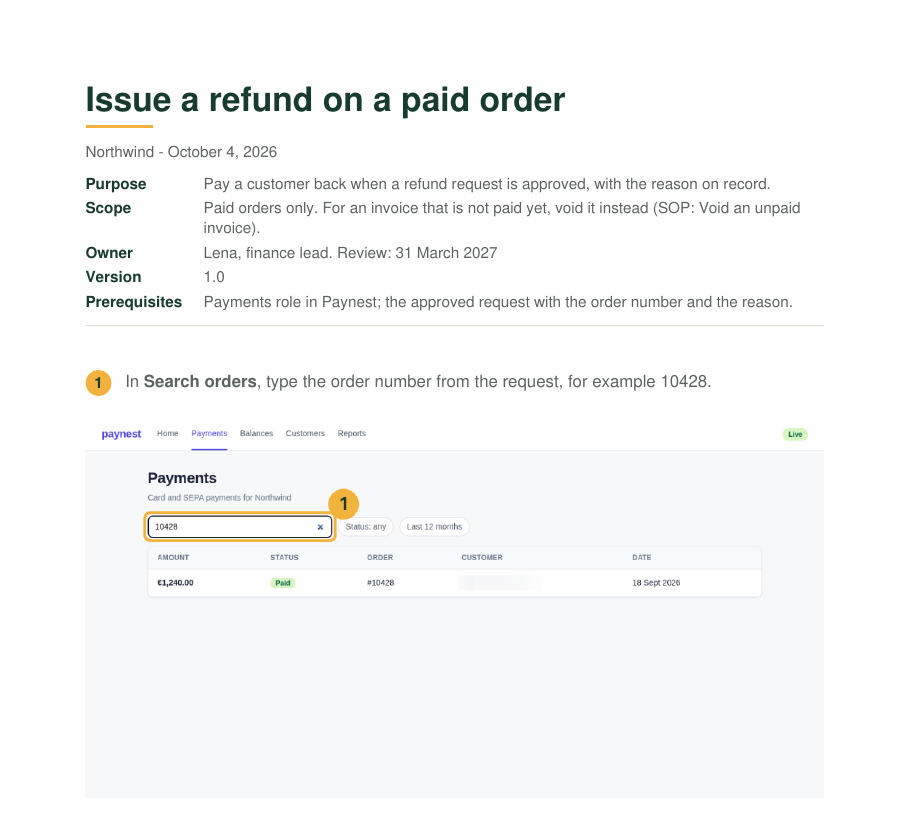
As a job aid
- Card
- Refund in Paynest
- Search orders
- The order number from the ticket
- Status
- Must read Paid; otherwise stop
- Actions
- Issue refund
- Refund note
- The reason from the ticket
- Limit
- Up to 200 EUR alone; above that, finance approves in the ticket first. A saved refund cannot be taken back: check the order number before Save refund.
As a quick reference row
| Task | Where | Field or menu |
|---|---|---|
| Refund a paid order | Paynest, Payments | Order details, Actions > Issue refund |
As a knowledge base entry
- Question
- How do I refund a customer whose return was approved?
- Answer
- Check the request within 1 business day, then issue the refund in Paynest: up to 200 EUR without approval, above that once finance approves in the ticket. Paste the confirmation into the ticket.
- See
- Procedure "Refunds for approved returns"
The clicks and the screenshots were captured once, from one run of the task. What changed between the five versions is the frame around them: the scope, the reader and the length. The frame decides the document.
The document types around an SOP
The ten types, each in two lines: what it is, and when to choose it. The job aid follows the work instruction it is cut from and is not counted as a type of its own.
Process description
One or two pages on purpose, scope, roles and hand-offs, for owners, auditors and new managers. Choose it when people disagree on what the work is for, where it starts and where it ends, before any procedure is written. German: Prozessbeschreibung.
Procedure and SOP
The how of one process, numbered, with roles and records. Choose it when the work must run the same way every time or is audited. What goes in one is covered in What is an SOP; a blank one to copy is the SOP template. German: Verfahrensanweisung.
Work instruction
How one person does one task, step by step at the screen, with a screenshot wherever the screen changes. Choose it for every procedure step done in a tool, so the procedure can name it instead of repeating the clicks. What goes in one, on a labelled example: Work instructions. German: Arbeitsanweisung.
Job aid
A page or a card used during the task, not before it: a checklist, a decision table or one annotated screenshot, cut from a work instruction or an SOP. Choose it for tasks done rarely, in a fixed order, or where one mistake is costly. German: Arbeitshilfe.
Quick reference guide
A one-page lookup across many tasks: where each one is, which field, which shortcut. Choose it when people know the job and forget the details. It differs from a job aid in breadth, not depth.
Training manual
Ordered for learning, not for doing: objectives, explanations and exercises, then the procedures. Choose it to onboard someone into a role, not into a single task.
User manual
Written for the users of a product or system and organised by what they want to do. Choose it when the readers are outside the team, such as customers, or the system is your own. The standard for it is ISO/IEC/IEEE 26514:2022, on the design and development of information for users of software.
The parts of a user manual, a blank template and a finished chapter are in User manual template.
Operations manual
How a team or a business runs as a whole: structure, recurring processes, contacts, what to do in an emergency. In practice a binder of process descriptions and SOPs with a frame around them. German: Betriebshandbuch.
Internal knowledge base
Short answers you can search, one question per entry, each linking to the procedure behind it. Choose it when the same questions keep coming up in chat. German: Wissensdatenbank.
IT documentation
Systems, configurations, accounts, runbooks and the procedures for admin panels. Choose it for anything IT must be able to rebuild or hand over. German: IT-Dokumentation.
Knowledge transfer
Not a document but a handover that produces documents: list the person's tasks, document each one while the person does it, and review the result with the successor. Choose it when someone leaves or a task moves to another team. German: Wissenstransfer.
The checklist, a worked example and a plan template are in Knowledge transfer.
Which document to write first
Start from the question the reader brings, not from the format.
| The reader asks | Write | Length | Kept current by |
|---|---|---|---|
| What happens and why, from trigger to result? | Process description | 1 to 2 pages | The process owner |
| Who does what, when, in which order? | Procedure (SOP) | A few pages | The procedure owner |
| How exactly, step by step at the screen? | Work instruction | One task, a screenshot per step | Whoever owns the procedure |
| I'm at the screen and forgot the field | Job aid or quick reference guide | One page or a card | Whoever owns the procedure |
| I'm new in this role | Training manual | A course, with exercises | The team lead or trainer |
| How do I use the product? | User manual | One section per user goal | The product owner |
| How does this team run? | Operations manual | A binder of the documents above | The manager |
| Where is the answer? | Internal knowledge base | A few lines per entry | Whoever answers the question |
| What does IT run, and how? | IT documentation | One record per system | The system's admin |
| Someone is leaving | Knowledge transfer | A task list and a work instruction per task | The leaver, then the successor |
For a small team, the order that works:
- List the recurring processes on one page.
- Write the process description for the one that causes the most trouble.
- Write its procedure, with the work instructions for the screens it touches.
- Cut a job aid from it only where errors actually happen.
The common mistake is to start at the other end, with a training manual or a knowledge base. Without the procedures underneath, the manual explains work nobody has agreed on, and the knowledge base entries link to nothing.
How to document a process
Seven steps, from a process that lives in people's heads to documents someone else can follow. Each step links to the guide that covers it in full.
- Name the process, its trigger and its result. One line each: at Northwind, "Refund an approved return" starts when a return is approved and ends when the refund is issued and the ticket closed. The process documentation template has a field for each.
- Name the roles, the owner and the interfaces. Who takes part, who owns the procedure, and where the process takes work from or hands it to another team or process (in German QM: Schnittstellen). Northwind's refund has one interface, finance: approval above 200 EUR and the Friday reconciliation.
- Draw the flow. For a single process, a flowchart with one box per step and both branches of each decision is enough. Use BPMN (Business Process Model and Notation) when the diagram crosses several teams or systems and everyone must read the symbols the same way; the Object Management Group calls it "the de-facto standard for business processes diagrams".
- Write the procedure. Who does what, when and in which order, with the rules and the records kept: How to write an SOP.
- Write a work instruction for each screen step. Do the task once and capture each screen, one step per action: Work instructions.
- Add one or two measures. Numbers the owner actually reads (in German QM: Kennzahlen), such as the share of refund requests checked within 1 business day.
- Test it on someone new, then set a review date. A colleague who has never done the task follows the documents alone; every question they ask marks a gap. Then the owner and the next review date go on every document, as below.
Keeping the documents current
- Name an owner and a review date on every document. ISO 9001 asks something close for documented information: identified, for example by title, date and author, then reviewed and approved (it does not prescribe a review interval), as ISMS.online summarises clause 7.5.2.
- Change the procedure first. Then update the job aid, the knowledge base entry and the manual sections from it, not the other way round.
- Expect screenshots to go stale first. A web app moves a button and every picture of that screen is wrong. Because the five Northwind versions share the same screenshots, the fix is to update the screenshot and the step once, in the work instruction, and reuse them in the others.
How to capture, crop, mark and redact those screenshots is covered in Screenshots for guides.
Sources
All pages checked on .
- The Core Solution: Clause 7.5 of ISO 9001:2015 explained. The standard and its term "documented information" (clause 7.5).
- Johner Institute: Standard operating procedures in quality management. ISO 9000:2015 clause 3.4.5, "specified way to carry out an activity or a process".
- SOPX: ISO 9001 SOPs and work instructions, what is required. Clause 7.5.1 in plain words; no particular set of SOPs is required.
- ISMS.online: ISO 9001 clause 7.5, documented information. Clause 7.5.2: identification, review and approval.
- European Standards: ISO/IEC/IEEE 26514:2022, Design and development of information for users. The standard for user documentation of software, edition 1, January 2022.
- Object Management Group: Business Process Model and Notation (BPMN), version 2.0.2. The specification page; BPMN as "the de-facto standard for business processes diagrams".