What knowledge transfer is
The term has other meanings. Universities use it for research moving into industry, and in IT outsourcing it is the client's knowledge moving to the service provider that takes over a system, as the University of Bern's research on IT outsourcing describes. This guide covers the job handover: one person leaves or changes role, another takes over the work.
Two kinds of knowledge move differently. Explicit knowledge (the supplier's contact, where the contract is filed) can be written down and handed over in an afternoon. Tacit knowledge is the kind that is hard to put into words; the philosopher Michael Polanyi summed it up in 1966 as "we can know more than we can tell" (Wikipedia, Tacit knowledge). It moves only by showing: doing the task while someone watches, and recording it while it is done.
Hansen, Nohria and Tierney named the two routes codification (knowledge written into documents) and personalization (knowledge passed from person to person) in the Harvard Business Review in 1999 (HBR, What's Your Strategy for Managing Knowledge?). A handover needs both. The person-to-person methods are shadowing (the successor watches the work), a tandem (both do the job together for a while), mentoring (the leaver stays available to answer questions) and a lessons-learned meeting at the end. This guide is about the documents that come out of them.
Knowledge transfer is therefore not one document but a process that produces documents: step-by-step guides for the recurring tasks, a job aid for the short ones, a list of access and contacts. Where it sits among the other document types is in Process documentation.
Why the usual handover form falls short
Most knowledge transfer templates that HR departments publish are questionnaires. The University of Virginia's template asks for a project status report, key contacts, external agencies, files to retain, reference documents and equipment, and recommends that departing employees "complete this a week before they leave". The Western University (Schulich) template has the same questions and one about procedures: "Do Standard Operating Procedures (SOPs) exist for your role?", with their location and last revision date.
These forms record what exists. They leave out two things:
- How the recurring tasks are done in the software, click by click. "Monthly export for the accountant" on a project list is a reminder, not something the successor can follow.
- The exceptions: the customer on an old price list, the month that starts on a Sunday. They live only in the leaver's head because the normal steps never mention them.
A week before the last day is also too late for anything that runs monthly or yearly: the task will not come round again in time. Start on the first day of the notice period. A retirement gives more warning: the date is known months ahead, so the plan can cover a full year of monthly and yearly tasks. AlphaLearn puts most knowledge transfer plans at 2 to 6 weeks at least, with 1 to 2 weeks of the successor shadowing the leaver before the handover date (AlphaLearn, Knowledge transfer plan).
What to capture: the checklist
Three lists, filled in by the leaver in the first week and reviewed by the manager.
Tasks
- Every recurring task, with its frequency (daily, weekly, monthly, yearly) and the system it happens in.
- Mark the ones done in a browser: admin panels, the CRM, billing, HR tools. Each of these gets recorded as a step-by-step guide.
- Put yearly and quarterly tasks first. Nobody will see them done before the last day, so they are walked through on the screens now.
- Open work gets one line each: status, next step, date. Not a guide.
Accounts and access
- For each system: the role or permission the work needs, who owns or administers it, and how the successor gets access.
- Never write a password into the handover. Credentials move through the team's password manager, or IT resets them.
- List what runs under the leaver's own account: shared mailboxes, scheduled reports, automations. They stop on the day the account is closed.
Exceptions
- The cases where the normal steps do not apply: a customer on an old price list, a failed export, a month-end on a weekend.
- Each exception goes as a note on the step it changes, not in a separate document, so the successor meets it at the moment it matters.
- The people to ask and the outside contacts: this is where the questionnaire part belongs, kept short.
Recording each browser task as a guide
The leaver does the task for real, at its real time, and records it: one step per action, a screenshot per step with the click marked. A step recorder does this as the task runs; the system's own screenshot keys (Win+Shift+S on Windows, Cmd+Shift+4 on a Mac) do it by hand. How to write each step is in Step-by-step instructions.
Then edit. Screenshots of billing, CRM and HR panels show customer names, emails and salaries: blur them before the guide is shared, and read Screenshots for guides for why blur is not always enough. Export the guide as a file the successor can keep (PDF, HTML or Markdown) and store it where the team's procedures live, not in the leaver's personal drive, which is closed with the account.
Worked example: Northwind's monthly export
Dana, operations coordinator at Northwind, a made-up online shop, hands in four weeks' notice. Sam, an operations assistant, takes over; Priya, head of operations, is the manager. One of Dana's tasks: on the first working day of each month, export last month's paid orders from Cartwell, the shop's admin panel, and send the CSV to the accountant. The next run falls in Dana's first week, on Thursday 1 October 2026, so Dana records the task that day, on the real export, rather than describing it from memory.
The guide's owner is Lena, the finance lead, not Dana. A guide owned by the person who leaves has no owner the day after.
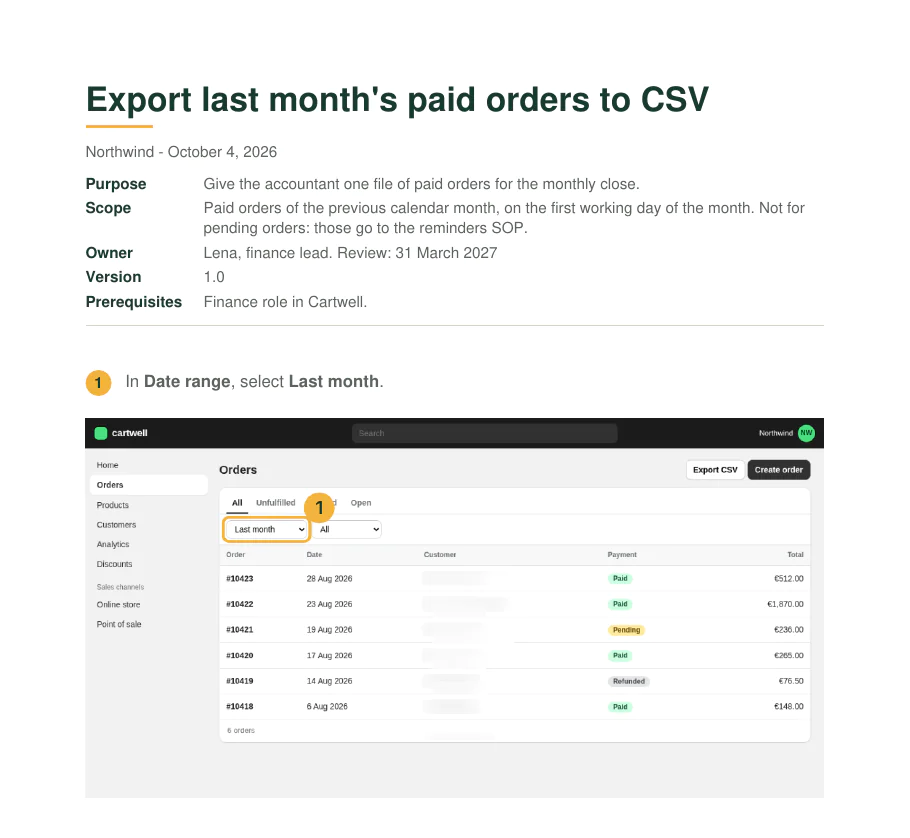
The recording has three steps: choose Last month in Date range, choose Paid in Status, click Export CSV. What the recording cannot show is what Dana knows and never clicks. Dana adds two notes, each on the step it changes:
| On step | Exception note |
|---|---|
| 1, Date range | The export always covers the previous calendar month: choose Last month (or a custom range from the 1st to the last day of that month), never Last 30 days. When the 1st falls on a weekend (1 November 2026 is a Sunday), the export runs on Monday 2 November and still covers 1 to 31 October. |
| 3, Export CSV | Three customers are still on the old price list and are invoiced by hand. Delete their rows from the CSV before sending it; the names are in the shared accounting folder. |
One recorded task, done by one person step by step at the screen, is a work instruction. Tasks of two or three actions that Sam already half knows become a one-page job aid instead.
Testing the transfer before the last day
A recorded task is not yet a transferred task. The test: the successor does each task alone, from the guide, while the leaver watches and does not help.
- The leaver stays silent. Pointing at the screen hides exactly the gap the test is meant to find.
- Every question is an edit. A question means a missing step or a missing exception. The leaver edits the guide on the spot, and the successor carries on from the edited version.
- Tasks whose real date comes after the last day are run where it is safe: an export can be repeated for a past month; a refund or a contract renewal is walked through on the screens up to the last click, and marked as such.
A task counts as transferred when the successor has finished it unaided. That is the sign-off criterion, and the manager signs per task, not for the handover as a whole. Elium's knowledge transfer plan builds its validation section the same way: "What the recipient must do alone, by when, and who signs it off" (Elium, Knowledge transfer plan template).
Knowledge transfer plan template
One plan per leaver, kept by the manager. It has five parts: a header (leaver, successor, manager, last day, start of the plan), the task inventory, the accounts list, a week-by-week schedule and the sign-off. Here is Northwind's, filled in at the end of week four.
Task inventory, filled in
| Task | Frequency | System | Guide recorded | Tested by successor | Exceptions noted |
|---|---|---|---|---|---|
| Export last month's paid orders | Monthly, first working day | Cartwell | Yes, 1 Oct | 19 Oct, on September's orders | 2 |
| Issue refunds on approved requests | About 10 a month | Paynest | Yes, 6 Oct | 14 Oct | 1 |
| Renew the carrier's rates | Yearly, November | Carrier portal | Walk-through, 30 Sep | Walked through, 21 Oct | 1 |
| Weekly stock report to purchasing | Weekly, Monday | Cartwell, scheduled | No: runs by itself | Moved to Sam's account, 14 Oct | 0 |
| Supplier emails in ops@ | Daily | Shared mailbox | No: shadowed in week 2 | Sam answered alone, 16 Oct | 0 |
Accounts list, filled in
| System | Role needed | Owner | Access arranged |
|---|---|---|---|
| Cartwell | Finance | Priya | 29 Sep |
| Paynest | Payments | Priya | 29 Sep |
| Carrier portal | Own login (Dana's is personal) | The carrier's account manager | Requested 30 Sep, received 5 Oct |
| ops@ mailbox | Member | IT | 29 Sep |
Schedule for a four-week notice
| Week | What happens |
|---|---|
| 1 | Task inventory and accounts list; access requested; yearly and quarterly tasks walked through and recorded; any task that falls this week recorded as it runs |
| 2 | Remaining browser tasks recorded as they come up, exceptions noted on their steps; the successor shadows the daily work |
| 3 | Test runs: the successor does each task alone from its guide; every question becomes an edit |
| 4 | Edited tasks tested again; scheduled reports and automations moved off the leaver's account; guides stored with the team's procedures; sign-off |
The sign-off line reads: "Every task in the inventory has been done by the successor without help, or is marked as walked through. Signed by the manager, date." In Northwind's plan, the carrier rates stay marked as walked through, and Priya books an hour with Sam in November when they are due.
Download the template
| Format | Blank | Filled in (Northwind) |
|---|---|---|
| Word, .docx | Blank (7 KB) | Filled (7 KB) |
| OpenDocument, .odt | Blank (26 KB) | Filled (31 KB) |
| PDF, 2 pages A4 | Blank (40 KB) | Filled (41 KB) |
| Markdown, .md | Blank (2 KB) | Filled (3 KB) |
No signup. Replace every text in [brackets]. The Markdown file pastes into a wiki, a ticket or a shared document as it is; the Word and OpenDocument files print on A4.
Sources
All pages checked on .
- University of Virginia HR: Knowledge Transfer Template (PDF). The questionnaire fields and the advice to complete it a week before leaving.
- Western University, Schulich School of Medicine & Dentistry: Employee Knowledge Transfer Template (PDF). The question whether SOPs exist, where they are and when they were last revised.
- Elium templates: Knowledge transfer plan. Validation as what the recipient must do alone, by when, and who signs it off.
- AlphaLearn blog: Knowledge transfer plan. 2 to 6 weeks for most plans, 1 to 2 weeks of job shadowing before the handover date.
- Wikipedia article: Tacit knowledge. The definition, and Polanyi's "we can know more than we can tell" (1966).
- Hansen, Nohria and Tierney: What's Your Strategy for Managing Knowledge? Harvard Business Review, March–April 1999. Codification and personalization as the two strategies.
- University of Bern, Institute of Information Systems: Knowledge transfer in IT outsourcing. The outsourcing meaning of the term.