The template
Every field carries a prompt in brackets: replace it, and the document is done. The four files hold the same fields in the same order.
- Process name
- [Verb + object, the way people ask for it]
- Process owner
- [One name and team]
- Version and date
- [1.0, date]
- Next review
- [Date, or the change that forces one]
- Approval
- [Prepared by, reviewed by, approved by, each with a date]
- Purpose
- [One sentence: the result and who gets it]
- Scope
- [Starts when … Ends when … Not covered: …]
- Trigger
- [The event that starts it]
- Inputs
- [What must exist before the first step, and who supplies it]
- Outputs
- [What exists when it is done, so that someone else can check it]
- Measures
- [One or two numbers that show whether the process works, and how often they are read]
- Roles and responsibilities
- [Role: what it decides or does]
- Process at a glance
- [One box per step, arrows for the handoffs, both branches of each decision]
- Steps
- [# / role / activity and handoff / linked document, 4 to 10 rows]
- Linked procedures and work instructions
- [Title and location of each procedure (SOP) and work instruction]
- Change log
- [Version, date, what changed, by whom: one line per version]
Download the template
| Format | Blank template | Filled in (Northwind refund) |
|---|---|---|
| Word, .docx | Blank (7 KB) | Filled (7 KB) |
| OpenDocument, .odt | Blank (23 KB) | Filled (26 KB) |
| PDF, A4 | Blank (42 KB, 3 pages) | Filled (42 KB, 2 pages) |
| Markdown, .md | Blank (2 KB) | Filled (3 KB) |
No signup and no email address. The Word and OpenDocument files open in Word, LibreOffice and Google Docs; the PDF is for printing and filling in by hand. The Markdown file pastes as it is into a wiki page, a README or a ticket, tables included.
What to write in each section
Each field has one rule that keeps it usable. Most weak process documents break one of these.
| Field | What goes in | The rule |
|---|---|---|
| Process name | Verb and object: "Handle a refund request" | Name it the way people ask for it, not after a department ("Refunds"). |
| Owner | One person and their team | The only name in the document. Everyone else is a role. |
| Next review | A date, or the change that forces a review | A document without one is out of date the day a rule changes, and nobody notices. |
| Approval | Prepared, reviewed and approved by, each with a date | Three different people where the team allows it. A process nobody approved is a draft, whatever its version number says. |
| Purpose | The result and who gets it | One sentence. If it needs "and", it is two processes. |
| Scope | Where it starts, where it ends | Name one case it does not cover, so the edge is visible. |
| Trigger | The event that starts it | An event, not a person or a habit: "a refund request arrives", not "support checks the inbox". |
| Inputs | What must exist before the first step, and who supplies it | Things you could point at: an email, an order number, an approved ticket. |
| Outputs | What exists when it is done | Someone else can check it: a refund saved, a ticket closed, an email sent. "Customer is happy" is not an output. |
| Measures | One or two numbers, and how often they are read | A number the owner actually looks at, such as days from request to result. Five measures nobody reads are worse than one. |
| Roles and responsibilities | Each role, and what it decides or does | Roles, not names, so the document survives a staff change. A RACI matrix is optional for a small team. |
| Process at a glance | A flowchart of the steps | The same numbers as the steps table, and every branch of a decision drawn, including the one that ends early. |
| Steps | Role, activity and handoff, 4 to 10 rows | No tool names, no button names, no screenshots, no deadlines in hours or days. Deadlines go in the linked procedure (SOP), buttons and screenshots in a linked work instruction. |
| Linked procedures and work instructions | Title and location of each procedure (SOP) and work instruction | A procedure (SOP) for who does what and when; one work instruction per step that happens on a screen. When a screen changes, only that work instruction is updated. |
| Change log | One line per version | Say what changed, not "updated". The next reader wants to know whether the change touches their step. |
Inputs and outputs are the I and the O of SIPOC (suppliers, inputs, process, outputs, customers), the table quality teams use to summarise a process before they improve it (SIPOC article on Wikipedia). The template needs no full SIPOC: the supplier of each input goes in the Inputs line, the customer in Purpose.
The same idea is in the ISO 9000:2015 definition of a process, quoted by SQT Training: "a set of interrelated or interacting activities that use inputs to deliver an intended result". The template follows that shape. It is not a format ISO prescribes.
Filled-in example: the Northwind refund process
Northwind is a made-up online shop; Paynest, its payments dashboard, and Ledgerly, its accounting tool, are demo apps. It is the same refund the other library pages use, written here as a process document.
- Process name
- Handle a customer refund request
- Process owner
- Lena, finance lead
- Version and date
- 1.0, 4 October 2026
- Next review
- 4 April 2027, or sooner when the refund rules change
- Approval
- Prepared by the finance lead, reviewed by the support lead, approved by the managing director, all on 4 October 2026
- Purpose
- The customer gets their money back, or their unpaid invoice cancelled, and a clear answer either way.
- Scope
- Starts when a refund request arrives in the support inbox. Ends when the customer has a confirmation email. Not covered: chargebacks through the card provider.
- Trigger
- A refund request email arrives in the support inbox.
- Inputs
- The request email with the customer's email address and the order number (from the customer).
- Outputs
- A refund issued, an invoice voided or a refund declined with a reason; the ticket closed with the result; a confirmation email sent to the customer.
- Measures
- Working days from request to confirmation (median per month); refund tickets the customer reopens per month. Read by the finance lead monthly.
- Roles and responsibilities
- Customer: sends the request, receives the confirmation. Support agent: logs and checks the request, issues refunds, tells the customer, closes the ticket. Finance lead: approves refunds over 200 EUR and voids unpaid invoices.
- Change log
- 1.0, 4 October 2026: first version (finance lead)
The process at a glance
- Log the request Support agent
- Check: invoice paid? Support agent
- Void the invoice Finance lead, if unpaid; then step 6
- Approve or decline If paid: finance lead above 200 EUR, support agent up to 200 EUR; a decline goes to step 6
- Issue the refund Support agent, if approved
- Confirm and close Support agent
The downloads draw the same six boxes as a flowchart, with the two branches after step 2 and the decline path from step 4 straight to step 6.
Steps and linked SOPs
| # | Role | Activity and handoff | Linked work instruction |
|---|---|---|---|
| 1 | Support agent | Logs the request as a ticket with the order number. | None |
| 2 | Support agent | Checks that the order matches the request and whether its invoice is paid. Hands the ticket to finance if the invoice is unpaid or the refund is over 200 EUR. | None |
| 3 | Finance lead | If the invoice is not paid: voids it, then go to 6. | Void an unpaid invoice |
| 4 | Finance lead or support agent | If it is paid: approves the refund in the ticket, or declines it with a reason (then go to 6). The finance lead decides above 200 EUR, the support agent up to 200 EUR. | None |
| 5 | Support agent | Issues the approved refund and notes it in the ticket. | Issue a refund on a paid order |
| 6 | Support agent | Sends the customer the confirmation and closes the ticket. | None |
Row 2 is the decision, and rows 3 and 4 are its two branches. Only the two rows that happen on a screen link a work instruction; the others are a judgement or an email, and need no screenshots.
The process names no tool and no deadline. That refunds are issued in Paynest and invoices voided in Ledgerly, and that the customer hears back within two working days, belongs one level down, in the procedure (SOP) and the work instructions it links to.
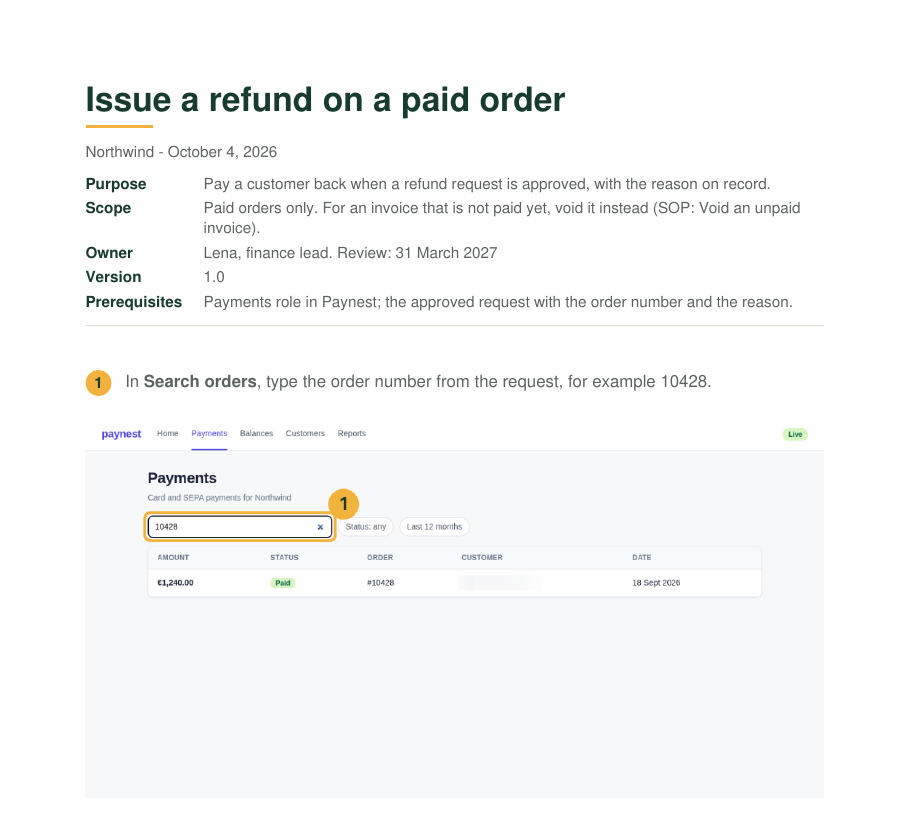
The process fits on two pages, flowchart included. The two work instructions it links to take six pages and nine screenshots between them: that is where the detail lives. When Paynest moves its refund button, only the refund work instruction is updated; the process document stays as it is.
Process document or SOP
| Document | Answers | Read by | Changes when |
|---|---|---|---|
| Process document | What happens and why, from trigger to result, and which roles take part | Managers, auditors, new staff | The way of working changes: a role, a step or a rule |
| Procedure (SOP) | Who does what, when, in which order, with which tool | The team running the process | A deadline, a tool or a handoff changes |
| Work instruction | How one person does one task, step by step at the screen | The person doing the task | The screen or the tool changes |
Small teams may merge process and procedure into one document: the steps table then carries the tools and deadlines, and the clicks still go into work instructions.
The documents around these two, and which one to write first, are laid out in Process documentation. Whether a process and a procedure are the same thing is answered on one refund in Process vs procedure.
Writing the linked work instructions
The screen steps are where the time goes, and where documents go stale first. Write one work instruction per screen step, by doing the task once and capturing a screenshot of each click as you go, with names and customer data blurred before it is shared.
- The method, from scope sentence to finished SOP: How to write an SOP.
- A blank SOP in the same four formats: SOP template.
- Five finished SOPs for browser tasks, including the two linked above: SOP examples.
- Cropping, marking and blurring the screenshots: Screenshots for guides.
Checklist before you publish it
A process document is one or two pages, or one screen in a wiki, with 4 to 10 steps. More steps usually means two processes, or click detail that belongs in a work instruction. Before it goes out:
- It fits on two pages.
- The trigger is an event.
- Every step names a role.
- Someone else could check each output.
- Every step that happens on a screen links a work instruction, and each link works.
- An owner and a next-review date are filled in.
Sources
All pages checked on .
- Wikipedia: SIPOC. Suppliers, inputs, process, outputs and customers, a table that summarises the inputs and outputs of a process.
- SQT Training: Applying the process approach to a quality management system. Quotes the ISO 9000 definition of a process.