What is an SOP
SOP stands for standard operating procedure. TechTarget defines it as "a set of step-by-step instructions for performing a routine activity". In practice it is a short document: a title, an owner, a date and numbered steps.
The "standard" in the name is the way the team itself has agreed to do the task, not an outside standard: ISO 9001, for example, leaves the form to the organisation (see below). As a document, an SOP for a browser task is often a page or two, kept where the work happens: a shared drive, a wiki or a printed binder. A collected set of them is usually called an SOP manual.
An SOP does three jobs:
- The task comes out the same on a busy Friday as on a quiet Monday.
- A new colleague can do it in week one without shadowing anyone.
- There is a record to show when someone asks how the work is done.
In office teams, many SOPs describe work in a browser: changing a customer's plan, updating a deal in the CRM, issuing a refund. This guide is written for tasks like these, not for the factory floor.
What goes in an SOP
A complete SOP has eight parts, usually in this order:
- Title: the task, named the way people ask for it ("Refund process").
- Purpose: one sentence on what the task achieves.
- Scope: when to use this SOP, and when not to.
- Owner: the one person who keeps it correct.
- Version and date: so a reader can see how old it is.
- Prerequisites: access, role, and what to have open before step 1.
- Numbered steps: one action each, with the words on the screen.
- Expected result, and what to do if it does not appear.
An example SOP for a browser task
Here is one for a refund at Northwind, a made-up company. The five steps are the task itself. The lines around them turn a list of clicks into an SOP.
- Title
- Refund process
- Purpose
- Move the customer's deal to final review and pull their order record, so finance can issue the refund.
- Scope
- Use for a refund a customer has asked for by email. Not for chargebacks, which go to finance directly.
- Owner
- Nina Alvarez, Operations
- Version and date
- Version 1, 21 September 2026
- Prerequisites
- Sales ops role in Northwind CRM and Billing; the customer's email address and order number from the request.
- Steps
-
- Select Deal stage: Final review.
- Type in Customer email the address from the request.
- Click Orders.
- Type in Search orders the order number, for example #10427.
- Click Export CSV.
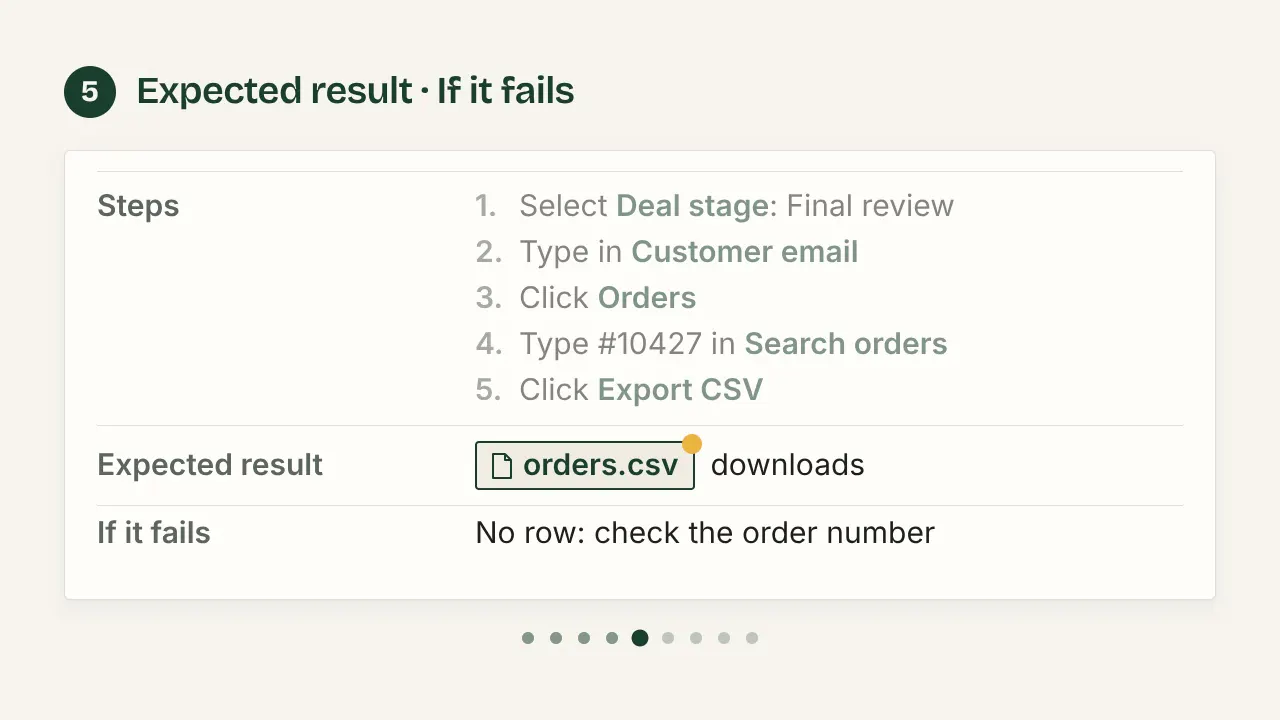
- Expected result
- orders.csv downloads with one row for that order. Attach it to the refund request.
- If it fails
- No row for the order number: check it against the request, then ask the owner.
A short task like this needs no title page, glossary or table of contents. Those belong to long, regulated documents. The minimum is a title, a date, the steps and the result.
SOP and work instruction
An SOP describes a process: what happens, in what order, and who is responsible. A work instruction describes one task, click by click.
| Document | Covers | Typical reader |
|---|---|---|
| SOP (procedure) | A process across roles: order, responsibility, hand-offs | Team leads, auditors, everyone involved |
| Work instruction | One task, click by click, often with screenshots | The person doing the task |
The quality standard ISO 9001:2015 uses neither term. It asks for documented information where the work is done, and leaves the form to you.
In a small team, the name matters less than one owner per document. Most "SOPs" for browser work are strictly work instructions, and that is fine.
The same task written at each level, side by side: SOP vs work instruction.
Formats: steps, sub-steps, flowchart
The Penn State Extension writing guide matches the format to the task:
- Simple steps for short routine tasks with few decisions.
- Hierarchical steps (main steps with sub-steps) or a graphic format for long tasks of more than ten steps with few decisions. Experienced staff read the main steps, new staff the sub-steps.
- A flowchart for tasks with many decisions.
For a browser task, numbered steps with a screenshot each fit most cases: the reader has to recognise the screen. One decision fits in a step ("If the status is Overdue, go to step 7"). Several need a flowchart or separate SOPs.
How to write an SOP, from plan to upkeep
Plan
Pick one task and one reader, and decide where the task starts and ends. Then write the scope sentence, before any step: "Use this when a customer asks for a refund by email." If it needs an "and", you have two SOPs.
Capture
Do the task once and note every click. Do not write it from memory: memory skips the steps that have become automatic, and those are the ones a new person misses.
Take a screenshot each time the screen changes, and note the exact label of what you clicked. The built-in tool is enough: Win+Shift+S on Windows, Cmd+Shift+4 on a Mac. Write the steps straight after, while the screens are fresh.
Word
- Write each step as a command that starts with a verb: "Click Save", not "The record should then be saved".
- One action per step. Two verbs in a step usually means two steps.
- Use the exact label on the screen, in bold, so the reader can match it.
- After a step that changes something, say what the reader should see.
- Blur or crop customer names, emails and anything secret in a screenshot before you share it.
Test
Give the SOP to someone who has never done the task. Watch them follow it, and do not help. Every question they ask marks a missing or vague step. Penn State's guide gives the same advice: "Have a person not familiar with the work follow the procedure."
Maintain
TechTarget suggests a review "every six to 12 months". For browser work, treat that as the minimum: web apps rename buttons and move menus without notice. Review whenever the screens or the process change, and at least once a year.
Keep the owner and the date on the SOP itself. Delete or clearly mark old versions wherever people find them: shared drives, wikis, printouts. The outdated copy is the one that causes the mistake.
A blank SOP to copy
A blank SOP with the eight parts above and a revision history is on its own page: the SOP template, as .docx, .odt, Markdown or PDF, with one admin-panel task filled in beside it.
Checklist before you share an SOP
- The scope sentence says when to use it, and when not to.
- An owner and a date are on the page.
- Prerequisites (access, role, what to have open) are listed.
- Every step has one action, starting with a verb.
- The labels in the steps match the screen today.
- Every change of screen has a screenshot, with personal data blurred.
- The expected result is stated.
- A first-time reader finished the task with no help.
Sources
All pages checked on .
- TechTarget: definition of a standard operating procedure. The definition, and the review every six to 12 months.
- Penn State Extension: Standard operating procedures, a writing guide. Choosing a format, and testing with someone new to the work.
- ISOTracker: document control in ISO 9001:2015. What the standard means by documented information.
- SOPX: ISO 9001, SOPs and work instructions. Clauses 7.5.1 and 8.5.1: the standard requires no particular set of SOPs.