Download the SOP template
| Format | Opens in | Pick it when |
|---|---|---|
| Word, .docx (8 KB) | Microsoft Word, Google Docs, Apple Pages | Your SOPs live on a shared drive or in SharePoint. |
| OpenDocument, .odt (26 KB) | LibreOffice, Google Docs | Your team works in LibreOffice. |
| Markdown, .md (2 KB) | Any text editor; wikis, Git, Notion by paste | Your SOPs live in a wiki or a repository. |
| PDF (40 KB, 1 page) | Any PDF reader, a printer | You fill it in by hand, or want to see the layout first. |
All four hold the same fields in the same order. Replace every text in [brackets], then delete the grey hints. The template is also in German, as "SOP-Vorlage", on the German version of this page.
Google Docs: upload the .docx to Google Drive and double-click it. Drive opens Office files in Google Docs, and .docx is one of the formats it converts (Google Docs Editors Help).
Word: the .docx uses Word's own Heading 1 and Heading 2 styles and plain tables, with no text boxes or fixed layouts to fight. Templates from elsewhere are not always that clean: asked for an SOP template for Word 2010 in Microsoft's forum in 2016, a volunteer moderator warned that many templates found online "are very nice looking but for producing Word documents they may be junk" (Microsoft Q&A).
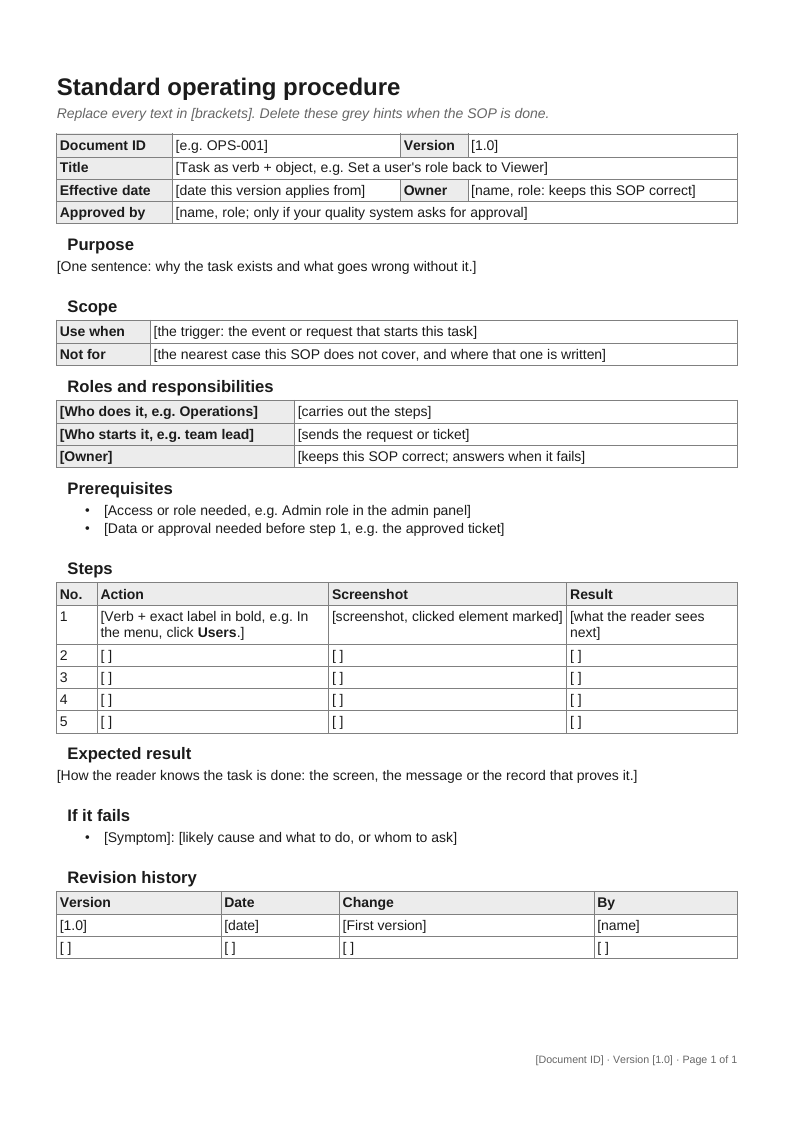
What each section is for
One line per field, in the order of the file. The last column says when a field can go.
| Field | What goes in it | Leave out when |
|---|---|---|
| Document ID | A short code that stays the same across versions, such as OPS-014. | No quality management system numbers your documents. |
| Title | The task as verb and object: "Set a user's role back to Viewer". | Never. |
| Version | 1.0 for the first issue, 1.1 for the next change of steps. | Never. |
| Effective date | The day this version applies from. | Never. |
| Owner | The person who corrects the SOP when the screens change. | Never. |
| Approved by | Who signed this version off. | Nobody has to approve SOPs in your company. |
| Purpose | One sentence on why the task exists. | Never. |
| Scope | Use when: the trigger. Not for: the nearest case it does not cover. | Never. |
| Roles and responsibilities | Who does the task, who starts it, and who answers when it fails. | One person does the task alone and owns the SOP. |
| Prerequisites | The access, role and data needed before the first step. | The task needs nothing beyond a login. |
| Steps | No., Action, Screenshot, Result: one row per action. | Never. |
| Expected result | What proves the task is done. | Never. |
| If it fails | The likely failure, its cause, and whom to ask. | The task has never failed in a way worth writing down. |
| Revision history | Version, Date, Change, By: one row per version. | Never. |
The template has no definitions or references section on purpose: a five-step task needs neither. Why an SOP has these parts at all is in What is an SOP.
SOP stands for standard operating procedure. Some quality systems split it into a procedure (who does what, and when) and a work instruction (how one task is clicked through); this template holds both for a single task, and SOP vs work instruction shows where the line runs.
Revision table
The revision table is the field people skip and the one a reviewer looks at first, because it tells the reader whether the copy in front of them is current. A printed SOP or a copy on a shared drive cannot update itself; the table is the only place that says which version it is and what changed.
The rule: add a row every time a step changes, and keep the version in the header equal to the newest row. The US EPA's guidance on SOPs puts a short title or ID, the revision number and the date on every page, noting that "the revision number and date are very useful in identifying the SOP in use" (EPA QA/G-6). The template's footer does that: document ID, version and "Page x of y" on every page, filled in by Word or LibreOffice.
A filled-in SOP: set a user back to Viewer
Northwind is a made-up company. A colleague moves out of the content team but stays at Northwind, so Operations sets their role in the Northwind admin panel from Editor back to Viewer. This is the template from above, filled in.
- Document ID
- NW-OPS-014, version 1.1, effective 1 October 2026
- Title
- Set a user's role back to Viewer
- Owner
- Nina Alvarez, Operations. Approved by Sam Okafor, IT lead
- Purpose
- Remove edit rights a colleague no longer needs after leaving the content team, so only current editors can change published content.
- Scope
- Use when a team lead's ticket says a colleague has moved out of the content team and keeps their Northwind account. Not for offboarding: someone who leaves Northwind is deactivated, not set to Viewer.
- Roles and responsibilities
- Operations (Admin role) carries out steps 1 to 5 and closes the ticket. The team lead opens the ticket with the colleague's email and the new role. Nina Alvarez, the owner, keeps the SOP correct and answers when it fails.
- Prerequisites
- Admin role in the Northwind admin panel (shown under your name, bottom left); the team lead's ticket with the colleague's email.
| No. | Action | Result |
|---|---|---|
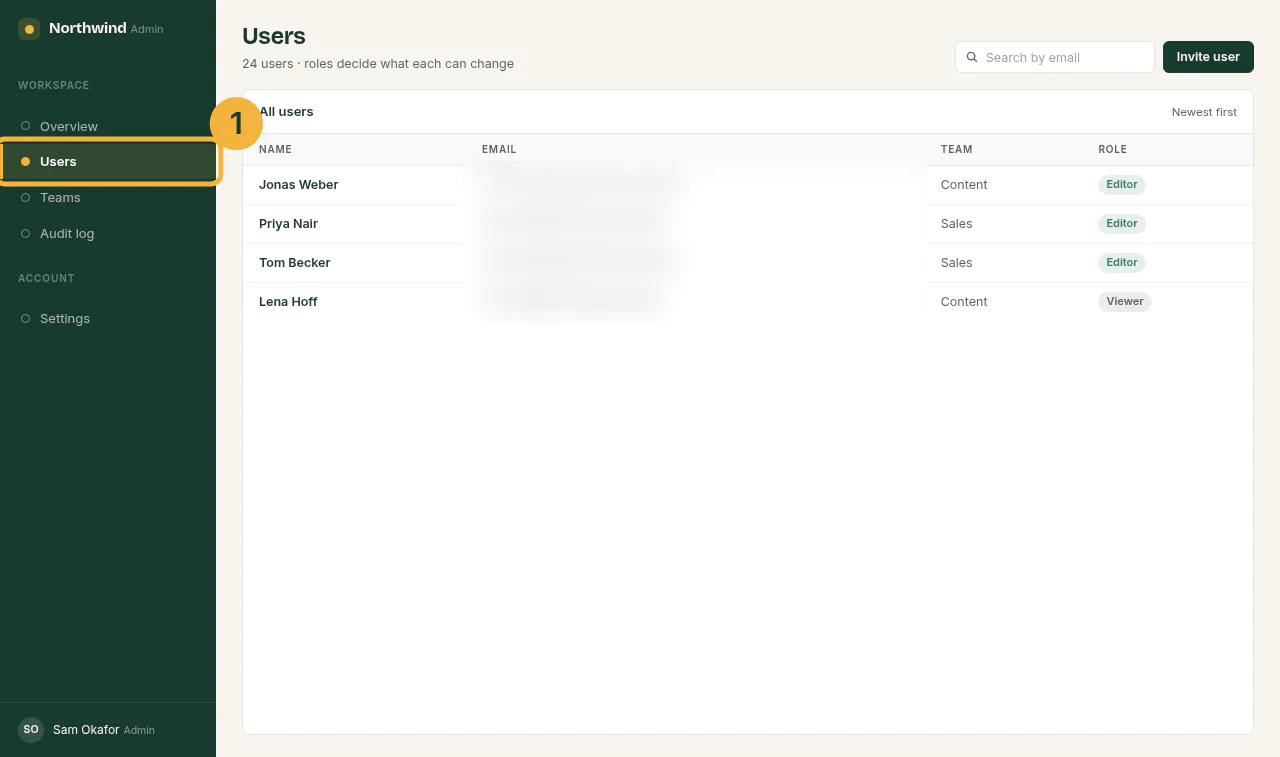
| 1 | In the menu on the left, click Users. | The Users page opens with the list of all users. |
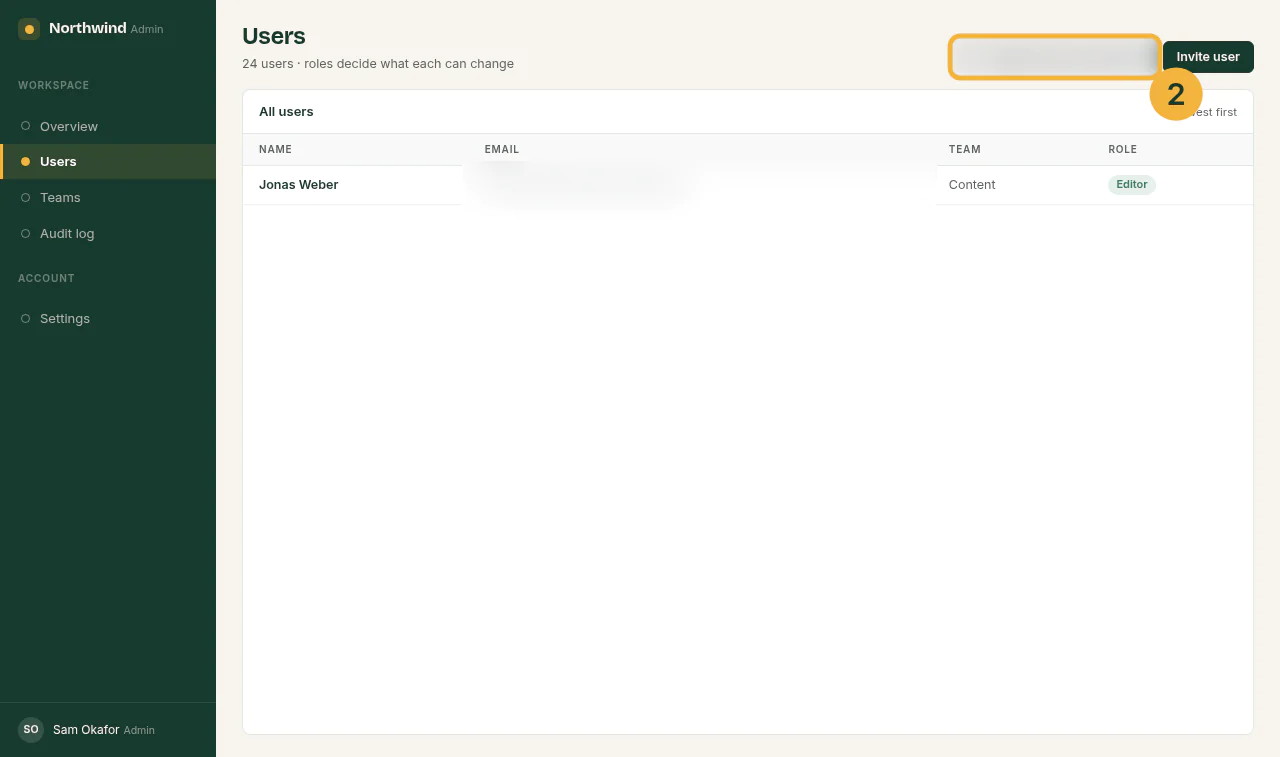
| 2 | In Search by email, type the colleague's email from the ticket. | Only their row stays in the list, with Role Editor. |
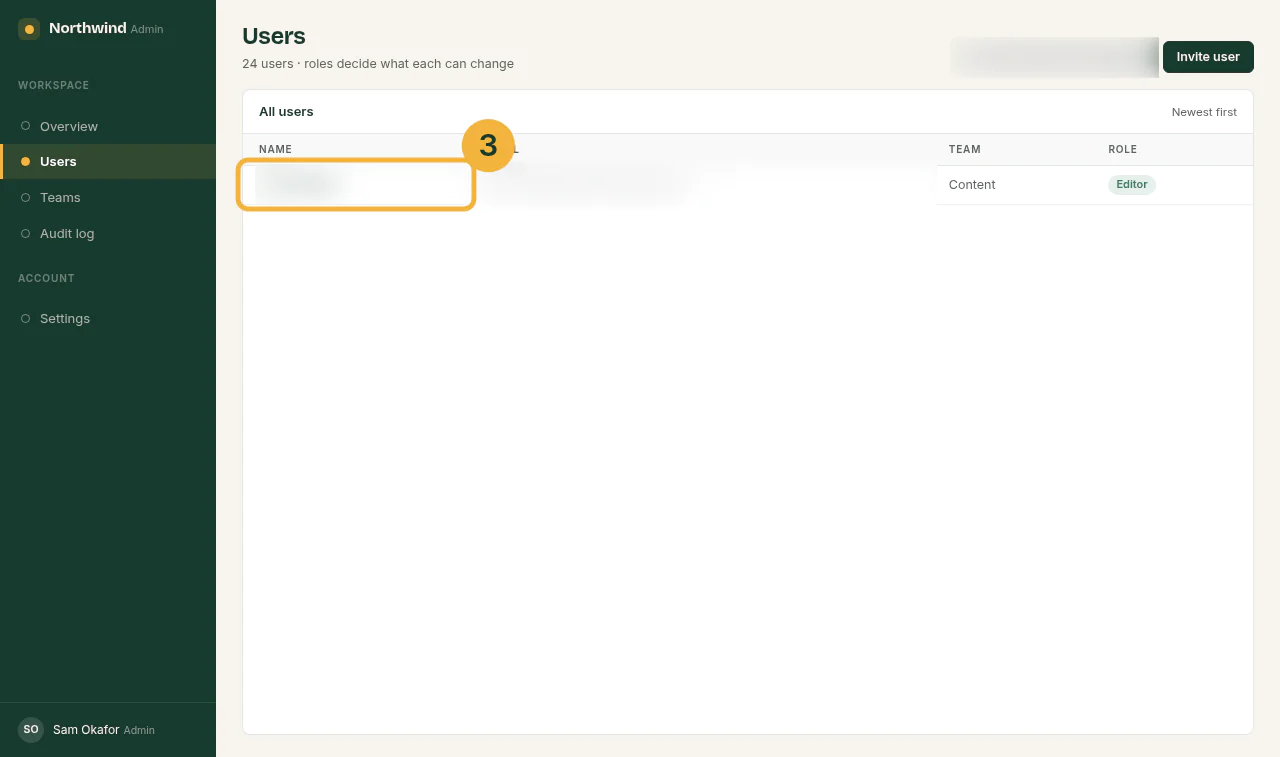
| 3 | Click the colleague's name. | Their details open above the list, showing Role: Editor. |
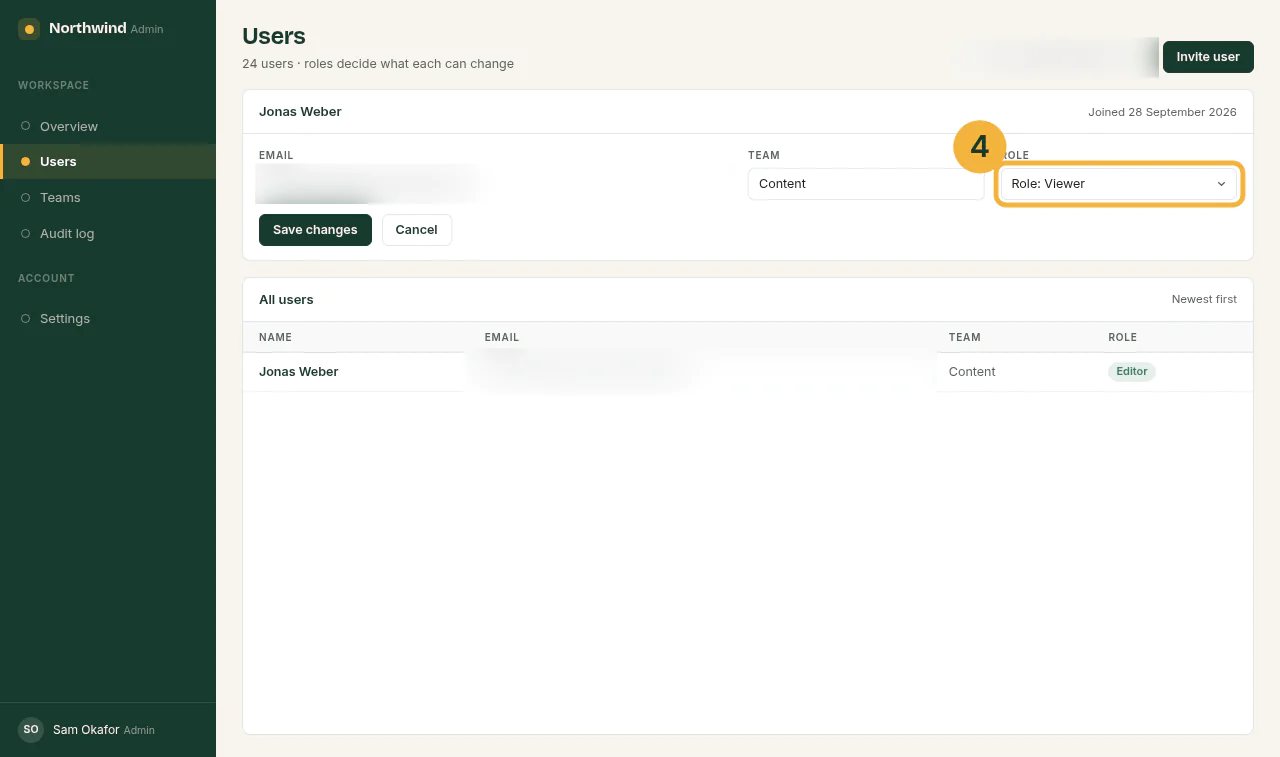
| 4 | In Role, choose Role: Viewer. | The Role field shows Viewer; the list below still says Editor until you save. |
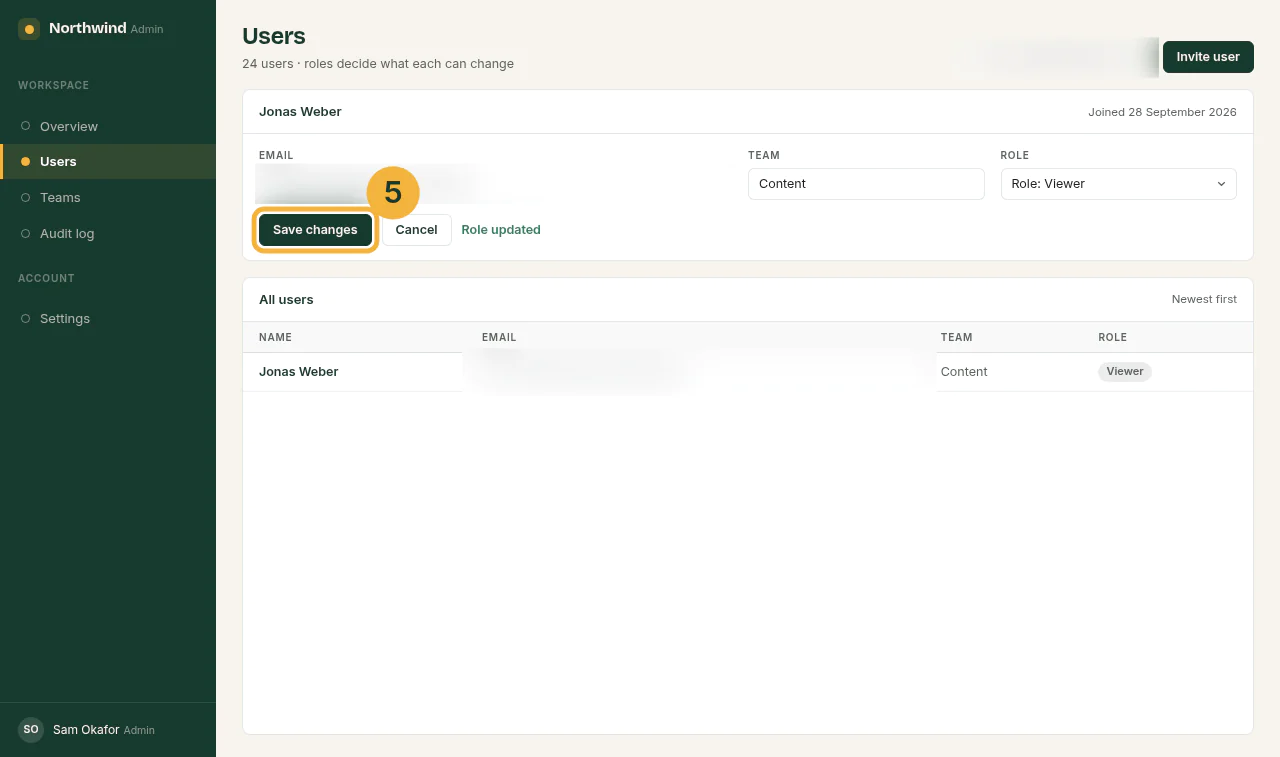
| 5 | Click Save changes. | "Role updated" appears beside the buttons. |
The screenshot column, one capture per step, with the clicked element ringed and every email address blurred:
- Expected result
- In All users, the colleague's row shows Role Viewer. Close the ticket with a note of the change.
- If it fails
- The Role list does not change, or Save changes does nothing: your own account is not Admin; ask Nina Alvarez. No row appears in step 2: check the email in the ticket for typos, then search by first name.
| Version | Date | Change | By |
|---|---|---|---|
| 1.0 | 14 September 2026 | First version | Nina Alvarez |
| 1.1 | 1 October 2026 | Step 5: button renamed from "Save" to "Save changes" after an app update; screenshot replaced | Nina Alvarez |
Row 1.1 is why the table exists. Anyone holding a printout that says "Save" in step 5 sees from the header that it is 1.0, and from the table what changed.
The whole filled-in SOP, screenshots included: Word, .docx (75 KB) or PDF (126 KB, 2 pages).
How to fill in the template
Fill it in this order; it saves rewriting:
- Write the scope first: the trigger and the one case it is not for. It decides where the steps start and stop.
- Do the task once for real and take a screenshot of every click.
- Write each step as a verb and the exact label on the screen, in bold, and its result.
- Add the expected result and the "If it fails" lines.
- Fill the header and the first revision row last.
For the screenshot column: one capture per change of screen, the clicked element marked with a ring or a box, and names and email addresses blurred before the file is shared. Crop to the part of the screen that matters, but keep enough around it to show where on the page it is.
Then hand the SOP to someone who has never done the task and watch them follow it without help. Penn State Extension's writing guide asks for the same: "Have a person not familiar with the work follow the procedure" (Penn State Extension). The full method, from first recording to review date, is in How to write an SOP; the wording of single steps is in How to write step-by-step instructions.
Other versions of the template
Two common variants are the same file with fields taken out or added, not new templates.
SOP checklist template
Delete the Screenshot and Result columns and put a tick box in front of each step. This suits staff who know the screens and only need not to skip a step. Penn State Extension notes that for a procedure that "is very repetitive and requires few decisions", a simple set of steps "is sufficient".
Keep the full version for new staff, and give the checklist the same document ID, owner and version, so both change together. The EPA guidance puts it this way: "the checklist is not the SOP, but a part of the SOP."
The checklist as a file, a tick box per step and the same footer: SOP checklist template, .docx (7 KB) or Markdown (1 KB).
Long or regulated SOPs
Under a quality management system or an audit, add what the EPA guidance lists for a title page and a longer SOP: the signatures and signature dates of whoever prepared and approved it, a definitions section for unusual terms, references to related SOPs, and a table of contents when the SOP is long. Add a distribution list if your quality system asks who holds a copy.
A browser task does not need the safety warnings, equipment lists or personal protective equipment fields that lab templates carry. Leaving them in only fills the page with "n/a".
Where blank templates go wrong
- No room for a screenshot. A steps grid with only a text column leaves the reader of a software task guessing which of three Save buttons is meant.
- No revision table. Outdated copies on a shared drive look exactly as current as the new one.
- Lab fields left in. PPE, equipment and hazards, each filled with "n/a", push the steps onto page two.
- One template stretched over several tasks. Write one task per SOP. When a job crosses several people and decisions, it needs a process map above the SOPs; SOP vs work instruction shows where each one fits.
Sources
All pages checked on .
- Google Docs Editors Help: Work with Office files. Double-clicking an Office file in Google Drive opens it in Google Docs; .docx is among the file types that convert to Docs.
- Microsoft Q&A: Template for standard operating procedures. A 2016 question about Word 2010, and a volunteer moderator's answer on templates found online.
- US EPA: Guidance for Preparing Standard Operating Procedures (EPA QA/G-6). Revision number and date on every page (section 2.5), the checklist as part of the SOP (2.4), and the title page and longer SOP parts (3.1 to 3.3).
- Penn State Extension: Standard Operating Procedures, a writing guide. Simple steps for a repetitive procedure, and a test by someone not familiar with the work.