The short answer
The definition most training texts build on comes from Allison Rossett and Jeannette Gautier-Downes' A Handbook of Job Aids (1991): "a repository for information, processes, or perspectives that is external to the individual and that supports work and activity by directing, guiding, and enlightening performance" (p. 45, as quoted in William Wake's Job Aids job aid).
In plain words: the knowledge sits on the page, not in the head, and the page is read at the moment of work. The Association for Talent Development puts the limit the other way round: job aids "are not to educate people from scratch; instead, they serve as reminders of workplace tasks people have already learned" (ATD, Design Considerations for Job Aids).
Another name for the same thing: checklist. Whatever the name, the rule is one task, one page. One page that holds many tasks is a quick reference guide.
One SOP and its job aid, side by side
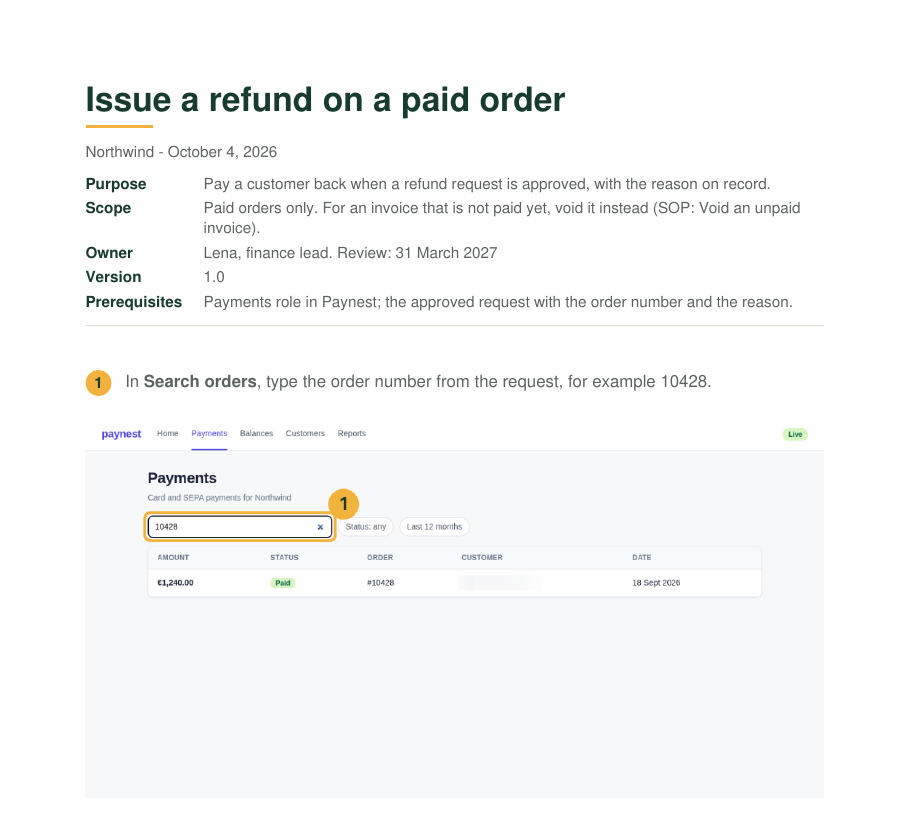
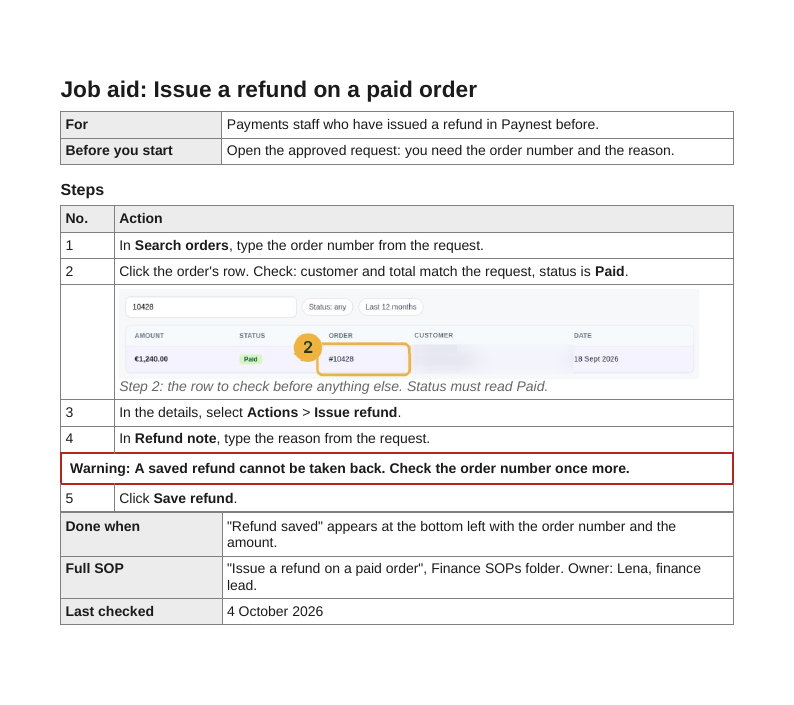
The SOP on the left is example 2 from SOP examples: issuing a refund on a paid order in Paynest, a payments dashboard used by Northwind, a made-up online shop. It has a purpose, a scope, an owner, a review date, prerequisites and five steps with a screenshot each, over three pages. The job aid on the right was cut from the same document and the same screenshots, down to one page.
What was cut, kept and added
| Change | What | Why |
|---|---|---|
| Cut | Purpose, owner, version, review date, the scope sentence, the reasons behind each step, four of the five screenshots | The reader already knows why refunds exist and when they apply. These lines are read once, during training or an audit. |
| Kept | The five actions in order, the exact labels in bold (Search orders, Refund note, Save refund), the done signal "Refund saved" | These are what a trained person forgets between two refunds. |
| Kept, moved | The warning "A saved refund cannot be taken back", now a boxed line of its own above step 5 | In the SOP it opens step 5. On a page that is scanned, not read, it has to stand out before the click. |
| Added | One cropped screenshot of the order row, with the status Paid and the order number, under step 2; a line naming the full SOP and its owner; the date last checked | The row is where refunds go wrong: the wrong order, or one that is not paid yet. The SOP line keeps the two documents tied together. |
The rule behind every cut: if a line is only read once, it belongs in the SOP, not in the job aid. Nothing on the job aid is new to someone who has done a refund before; the screenshot shows a screen they have seen, cropped to the part they must look at.
When a job aid is enough
A job aid fits when all of these hold:
- The reader has done the task before or has been trained on it.
- The task is occasional, an error is costly, or the screens change often. William Wake's job aid checklist names infrequent performance, serious consequences of errors and a large or changing knowledge base among the cases for a job aid; the ATD names low frequency, high complexity, a high consequence of error and a high probability of change.
- The steps fit on one page without decisions that need judgement.
Frequency is the part most often got wrong. A task done every day is learned by heart and needs no aid. Dave Ferguson's example is an insurance agent who writes "maybe six flood insurance policies a year": not a task anyone can do without support, and exactly the one a job aid is for, because "job aids don't forget" (Ferguson, When to build a job aid). At Northwind, a support agent who issues two refunds a month is that agent.
When it is not
- The reader has never done the task. New staff need the SOP or training first; the job aid assumes both.
- There is no time to look anything up. Rossett and Gautier-Downes advise against job aids where speedy or fluid performance is needed, and where novel situations predominate. A live support call is the usual case.
- The task is safety-critical and rare. For high-risk industrial work, the Human Performance in Oil and Gas fact sheet says to "always use a detailed written procedure" where the task involves infrequent or novel actions (HPOG, Procedures and Job Aids). Rare and costly can mean the full procedure, not the card.
- The job aid is only a summary of an SOP. Then the SOP stays the source. Change the SOP first, then cut the job aid again from it; never the other way round.
A job aid does not replace training, and having one on file does not show that the work was done correctly.
Job aid vs SOP
| Aspect | Job aid | SOP |
|---|---|---|
| Reader | Someone who has done the task | Anyone, including a first-timer or an auditor |
| Purpose | Do it right now, without a slip | Agree how the task is done, and record it |
| Length | One page or a card | Several pages |
| Owner and review date | Points to the SOP's | On the document |
| Read | During the task | Before it, in training, or in an audit |
Two more documents get confused with it. A work instruction is the longer click-by-click form of one task; the job aid is cut from it, or from the SOP, for someone who has done the task before. A training manual is ordered for learning a whole role, with explanations and exercises, and is read before the work, not during it. A quick reference guide is the job aid's idea across many tasks: wider, not deeper. Which one a situation needs is laid out in Process documentation.
Where the job aid sits among process documents, and what goes in an SOP, are covered in What is an SOP and SOP vs work instruction.
Formats of a job aid
The shape of the task decides the format. The University of San Diego names five formats that cover most needs: step-by-step manuals, flowcharts, decision tables, checklists and reference guides, each fitting a different type of task (University of San Diego, What Is a Job Aid):
| Format | Fits a task that | Browser example |
|---|---|---|
| Steps | Runs in a fixed order with no decisions | The Northwind refund above |
| Checklist | Has many items done in any order | Settings to check before a new user's first login |
| Flowchart | Branches on yes or no | Refund or void: is the invoice paid? |
| Decision table | Has several variables, each with options | Which role to give, by team and seniority |
| Reference card | Has no steps, only facts to look up | Where each report lives in the admin panel |
For screenshots, keep one at most, of the field or menu people miss, cropped close and with names, emails and customer data blurred. Screenshots for guides covers cropping, marking and why blur is not always redaction.
Job aid template
The template holds eight fields on one page, in this order: task title, who it is for, before you start (one line), steps (seven at most), a warning row placed directly above the step it is about, done when, where the full SOP lives, and the date last checked.
The checklist and decision-table templates keep the same frame (who it is for, one warning row, the full SOP, the date last checked). The checklist has ten items with a tick box and where each one is checked, and a line for what to do when an item fails. The decision table has two condition columns and an outcome, and a line for what to do when no row fits.
| Download | Steps, blank | Steps, filled in (Northwind refund) | Checklist, blank | Decision table, blank |
|---|---|---|---|---|
| Word, .docx | Blank (6 KB) | Filled (20 KB) | Checklist (6 KB) | Decision table (6 KB) |
| OpenDocument, .odt | Blank (18 KB) | Filled (36 KB) | Checklist (19 KB) | Decision table (20 KB) |
| PDF, 1 page | Blank (35 KB) | Filled (50 KB) | Checklist (40 KB) | Decision table (34 KB) |
| Markdown, .md | Blank (1 KB) | Filled (1 KB) | Checklist (1 KB) | Decision table (1 KB) |
Replace every text in [brackets] and delete the grey hints. The Markdown files carry the text only; the filled screenshot is in the Word, OpenDocument and PDF versions. The line "where the full SOP lives" is the one not to skip: it is how a reader who is unsure finds the long version, and how whoever changes the SOP finds the job aid to change with it.
Cut the job aid from the SOP
- Start from the finished SOP and its screenshots, not from a blank page, so the labels and the order match.
- Delete every line a trained person would only read once: purpose, scope, owner, reasons.
- Shorten each step to one line: the verb and the exact label in bold.
- Move each warning onto a line of its own, above its step.
- Keep one screenshot, of the place where mistakes happen, and blur personal data.
- Add the SOP's title and owner, and test the page by doing the task with it in hand.
When the screens change, record or re-capture the task once, update the SOP, and cut the job aid from it again. Two documents edited separately drift apart within a few releases.
Job aid or job aide
Job aid. An aid is a thing that helps; an aide is an assistant or helper, such as a teacher's aide (Dictionary.com). The document is a job aid.
Sources
All pages checked on .
- William Wake: Job Aids job aid (Word). Quotes Rossett and Gautier-Downes' definition from A Handbook of Job Aids (1991, p. 45) and lists when to use and avoid job aids.
- ATD: Design Considerations for Job Aids (PDF). Low frequency, complexity, consequence of error and probability of change as criteria; job aids as reminders, not teaching.
- Dave Ferguson: When to build a job aid, ask the task (2012). Six flood policies a year, and "job aids don't forget".
- Human Performance in Oil and Gas: Fact sheet 03, Procedures and job aids (PDF). A detailed written procedure for infrequent or novel actions.
- University of San Diego: What Is a Job Aid?. Five formats that cover most needs: step-by-step manuals, flowcharts, decision tables, checklists, reference guides.
- Dictionary.com: aide. An aide as an assistant or helper, especially a paid employee.