What safe means for an extension
Every extension submitted to the Chrome Web Store goes through the same review, which combines automated systems and manual checks, according to Google's documentation of the review process. That review is why the share of malware is small. It is not a promise about any single extension, and it looks at the version submitted, not at what the next one will do.
The better frame comes from an ethical hacker quoted in PCWorld: an extension is software like any other, with access to the pages you open, so judge it the way you would judge a program before installing it. What an extension is made of, and what its manifest declares, is explained in What is a browser extension.
How a safe extension becomes unsafe
Chrome updates extensions in the background, without asking, unless the update adds a new permission warning. A trusted extension can therefore change overnight, and the two documented ways it happens are a sale and a stolen developer account.
Sold to a new owner: The Great Suspender
The Great Suspender saved memory by putting unused tabs to sleep and had over 2,000,000 users. In June 2020 its developer sold it to an unknown buyer, BleepingComputer reported. Version 7.1.8, released in October 2020, added scripts that tracked users and ran code fetched from a remote server. Microsoft removed it from the Edge store first. On 4 February 2021 Google delisted it as malware and disabled it on users' machines, as 9to5Google recorded.
Hijacked publisher account: Cyberhaven
On 24 December 2024 a phishing attack compromised the Chrome Web Store access of an employee at Cyberhaven, a security company, per Obsidian Security's analysis. Early on 25 December the attacker published version 24.10.4 under the company's real extension, and Chrome pushed it to users automatically. It targeted logged-in sessions and cookies. Cyberhaven detected it at 23:54 UTC that day, removed it within an hour and released a clean 24.10.5, according to KeepAware, which also links other extensions to the same campaign.
What the two cases mean
In both cases the extension was fine on the day people installed it. The checks below are about who publishes it and how it updates, so they are worth repeating, not doing once. Manifest V3 now forbids loading code from a server, which closes the route The Great Suspender used. It does not stop a malicious update that is signed and published through the store, which is what happened to Cyberhaven.
Five checks before you install
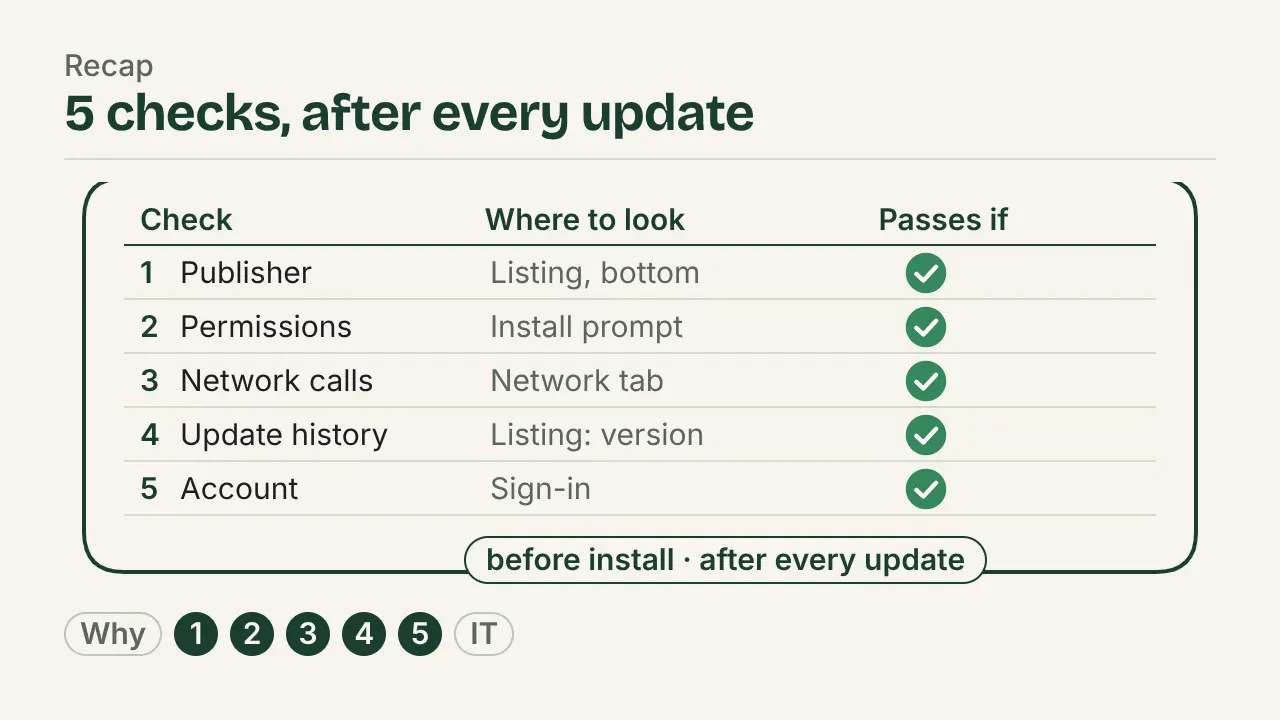
Each check says where to look and what passes. Together they take about ten minutes per extension, and the table is meant to be copied into an approval form.
| Check | Where to look | Passes if |
|---|---|---|
| Publisher | Store listing, developer block | A named company or person you can find outside the store, whose website links back to the listing |
| Permissions | Install warnings; Details in chrome://extensions | Every permission explains a feature; access to all sites is optional or per site |
| Network calls | Listing's privacy practices; the service worker's Network panel | What you see sent matches what the listing declares, and the job needs it |
| Update history | Listing's version and Updated date; release notes | Steady updates from the same publisher, with notes on what changed |
| Account requirement | Listing description; first run | No account for the job, or a stated data location and deletion process |
Publisher
The lower part of a store listing names the developer, often with a website, an email address and whether the developer has declared itself a trader. A pass is a company or person you can find outside the store. Watch for a listing that names no one, and for a developer name that recently changed: that is how a sale shows from the outside.
Permissions
Read the warnings Chrome shows at install and match each one to a feature the extension claims to have. A pass is when every permission explains a feature and broad access to websites is optional or granted per site. Common warnings, quoted from Chrome's permissions list:
| Warning | What the extension can do | Fits a job such as |
|---|---|---|
| "Read and change all your data on all websites" | Run code in every page you open | An ad blocker or password manager; not a calculator |
| "Read your browsing history" | See the address and title of open tabs | A tab manager, or a tool that records which page a step happened on |
| "Read and change your browsing history on all signed-in devices" | Read and delete your history | A history search tool |
| "Communicate with cooperating native applications" | Talk to a program installed on the computer | A desktop password manager's browser companion |
What each permission and each kind of site access means in full is covered in what a browser extension can see.
Network calls
Ask whether the extension needs a server for its job at all; the listing's privacy practices say what the developer declares it collects. To see what it sends, turn on Developer mode in chrome://extensions, click "service worker" under Inspect views, open the Network tab and do the job once. The full method is in how to check what an extension sends.
Update history
The listing shows the current version and the date it was last updated. Years of silence can mean the extension is abandoned and may be up for sale; a sudden burst of updates after a long gap can mean a new owner. A pass is steady updates from the same publisher with release notes. When an update adds a permission that triggers a new warning, Chrome disables the extension until you accept, per Chrome's permission warnings guide. Treat that prompt as a new review, not as a click-through.
Account requirement
An account means your work is tied to a server: at least a login, often the content itself. For sensitive work, a pass is no account for the job, or an account with a stated data location and deletion process. This is not a verdict against cloud tools; it is the question a data protection review will ask.
Safe at work: what IT adds
Checks by each employee do not scale, so IT usually blocks every extension and allows approved ones by ID, and can also block by permission or keep extensions off named sites. The steps, and an approval sheet to fill in, are in how IT approves and rolls out an extension. On each machine, Chrome's Safety Check additionally flags installed extensions that left the Chrome Web Store because they were detected as malware, broke store policy or were unpublished by the developer, per BleepingComputer.
The checklist run on one extension
The extension checked here is the publisher's own, stepkeep, a step recorder made by the team that writes this library. It was chosen because every answer can be shown, including the manifest. What the checks showed on 1 October 2026:
| Check | What we found | Where to verify it yourself |
|---|---|---|
| Publisher | GRAN Software Solutions GmbH, Berlin | Store listing; the Impressum linked in this site's footer |
| Permissions | activeTab, tabs ("Read your browsing history"), storage, scripting, downloads ("Manage your downloads"); access to a site is requested for that one site when recording starts | Install warnings; Details in chrome://extensions; the manifest in What is a browser extension |
| Network calls | No request to a server in its code; licence keys are checked offline against a signed message | The service worker's Network panel while recording and exporting |
| Update history | Version 1.4.0 | Version and Updated date on the store listing |
| Account requirement | None | First run: recording starts without a sign-in |
This is what the checks show today, not a promise about every future version. The same five checks apply after each update, to this extension as to any other.
Sources
All pages checked on .
- Cybersecurity News: Google's figure on malware in Chrome Web Store installs (June 2024). Under 1% of 2024 installs contained malware, as stated by Google's Chrome Security Team in June 2024.
- Chrome for Developers: Chrome Web Store review process. All submissions go through the same review, combining automated and manual checks.
- BleepingComputer: Google Chrome to warn when installed extensions are malware. What Safety Check flags.
- PCWorld: Chrome extensions are software, treat them like it. The framing of an extension as software; keep few, remove unused ones.
- BleepingComputer: The Great Suspender Chrome extension's fall from grace. The June 2020 sale, over 2,000,000 users, version 7.1.8 and its remote code, the Edge store removal.
- 9to5Google: The Great Suspender removed from the Chrome Web Store. Delisted and disabled on users' machines on 4 February 2021.
- Obsidian Security: Behind the breach at Cyberhaven. The phishing attack of 24 December 2024 and version 24.10.4.
- KeepAware: Cyberhaven browser extension compromise. Publication on 25 December, detection and removal, version 24.10.5, sessions and cookies, related extensions.
- Chrome for Developers: What is Manifest V3. No remotely hosted code.
- Chrome for Developers: Permissions list. The warning text for each permission.
- Chrome for Developers: Permission warning guidelines. An update that adds a warning disables the extension until the user accepts.