A Scribe AI alternative that writes each step on your machine
stepkeep is a Chrome extension that records a browser task and turns it into a step-by-step guide with annotated screenshots. It uses no AI model: each sentence is written in your browser from the label on the button you pressed. Nothing is uploaded, there is no account, and it costs 59 EUR once. It exports PDF, HTML and Markdown.
Free keeps five guides at a time, with a watermarked PDF. No card, no trial clock.
- On your machine
- 59 EUR once
- PDF, HTML, Markdown
What Scribe AI does better
stepkeep has no AI at all, so on anything a language model is good at, Scribe wins. If one of these is the reason you searched for Scribe AI, Scribe is the better tool for you.
- Titles and descriptions Scribe AI writes a guide's title and a description of what it does by reading the steps. In stepkeep you type both yourself.
- A whole document from a prompt Scribe's page generation drafts an SOP from a prompt. stepkeep writes down only what you recorded, click by click.
- Voice Scribe turns steps into narrated audio and transcribes what you say. stepkeep has no audio of any kind.
- Translation Scribe Enterprise translates guides into other languages. stepkeep writes in the language of the page you recorded and does not translate.
- Automatic redaction Scribe Enterprise finds and hides personal and health data on its own. In stepkeep you drag a blur over what should not be seen.
- Desktop apps Scribe Pro records Windows and Mac applications. stepkeep records browser tabs and nothing else.
Scribe AI and stepkeep, row by row
Scribe AI is not a separate product: it is the set of AI features inside Scribe. So the rows below compare what writes your guide, who handles the text, and what it costs.
| Feature | stepkeep | Scribe |
|---|---|---|
| Who writes each step | The extension, from the label on the button or field you used. No AI model | The capture itself. Scribe says this core function does not use AI1 |
| Titles and descriptions | You type them | Written by AI, from the steps1 |
| A document from a prompt | No | Yes, page generation1 |
| Who handles your text for the AI | Nobody. stepkeep makes no network request | Third-party AI providers, not named on the page. They may not train on it and delete it within 30 days21 |
| Screenshots sent to an AI | No. There is no AI and no upload | No. Scribe says its AI providers never receive the images1 |
| Where your guides live | Your own browser profile, on your machine | Scribe's cloud gallery, behind a sign-in3 |
| Turning the AI off | Nothing to turn off | Enterprise customers can opt out1 |
| AI on the price list | None, on any plan | "AI-powered automatic capture" and "Improve workflows with AI" are rows in the plan table4 |
| Price for one person | 59 EUR once, incl. VAT (Personal) | 25 USD a month billed yearly, 35 USD billed monthly (Pro Personal)4 |
| Price for a team | 149 EUR once for everyone at one company (Team) | 13 USD per seat a month billed yearly, five seats minimum (Pro Team)4 |
| Hiding personal data | Blur by hand, on every plan | Automatic redaction of personal and health data on Enterprise4 |
Scribe column checked on , on Scribe's own pages. Prices are in US dollars, as Scribe publishes them. They change; if you find one out of date, tell us and we will correct it.
The step-by-step part of Scribe was never the AI
- stepkeep
- Each step written from the button you pressed, in your browser
- Scribe
- Steps from the capture, then AI from third parties for the writing around them
Search for Scribe AI and you find a product sold on its AI. Scribe's own security page is more precise: the core function of automatically creating step-by-step guides does not use AI. The AI is the writing on top of the steps: titles, descriptions, a whole SOP drafted from a prompt, narration and transcription.
That writing is useful if your guides need a lot of prose around them. It also means your text goes to third-party AI providers, which Scribe's AI page does not name. Scribe says they never receive the images, may not train on your data and delete it within 30 days. For many teams that is enough. For some, every new processor is a line in a register that someone has to sign off.
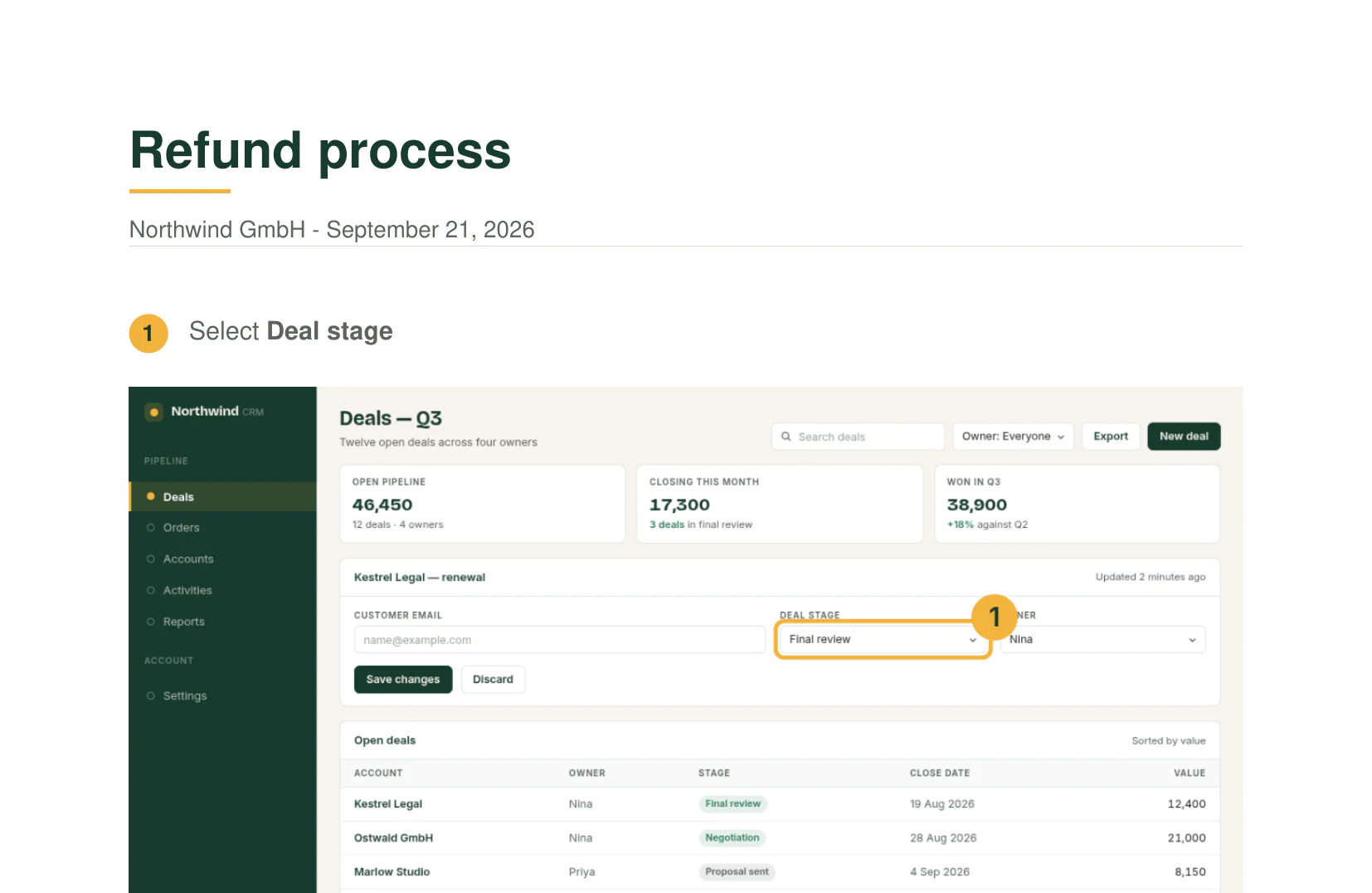
If what you want is the part Scribe says is not AI, clicking through a task once and getting numbered steps with screenshots, that part needs no model and no server. stepkeep reads the label of the button, link or field you used and writes the sentence in your browser: Select Deal stage, Type in Customer email, Click Save changes. You can edit every sentence afterwards.
Open DevTools, go to the Network tab and record a guide. Count the requests. There are none. Nothing is sent to us or to an AI provider, so there is no transfer to assess and no processor to name.
Moving from Scribe in three steps
-
Keep what you have
Export the Scribe guides you want to keep as PDF or Markdown while your Pro seat is active, AI-written text included. Scribe's file exports are a Pro feature.
-
Record your most used guides again
stepkeep cannot import a Scribe guide. Recording one takes about as long as doing the task once, and the step sentences are written for you.
-
Add the context yourself
Give the guide a title, reword any step that needs it, put your logo on it, then export a PDF, a single HTML file or Markdown for your wiki.
Scribe AI or stepkeep
Choose Scribe if…
- You want AI to draft titles, descriptions or a whole SOP for you.
- You want guides narrated, or translated into other languages.
- You need to document desktop software, not browser tabs.
- Your company needs single sign-on, roles and an audited vendor.
Choose stepkeep if…
- You want the steps written from what you clicked, with no AI model involved.
- Screenshots of your work may not leave your machine, and someone has already told you so.
- You write a handful of guides a month and a monthly seat makes no sense.
- You want files you own: PDF, HTML or Markdown, readable without an account.
Questions about Scribe AI
Does Scribe use AI to create step-by-step guides?
Not for the steps themselves. Scribe's security page says the core function of automatically creating step-by-step guides does not use AI. Its AI features are titles, descriptions, page generation, text-to-speech and speech-to-text, run by third-party AI providers (checked 24 September 2026).
Does stepkeep use AI?
No. stepkeep has no AI model, in the browser or anywhere else. Each step sentence is built from the visible label of the element you clicked, typed in or chose, and you can edit it. Titles and any extra explanation you write yourself.
Is my data used to train Scribe AI?
Scribe says it does not allow its AI providers to train on your data, that they delete it within 30 days, and that they never receive the images in your guides (checked 24 September 2026). The providers are not named on its security or AI page. Enterprise customers can switch the AI features off.
Which Scribe plans include AI?
Scribe's pricing page lists "AI-powered automatic capture" and "Improve workflows with AI" as rows in its plan table; check the table for which plan includes which. Pro Team is 13 USD per seat a month billed yearly, with five seats minimum (checked 24 September 2026).
Is there a free Scribe AI alternative?
stepkeep Free keeps five guides at a time and exports them as PDF with a small watermark, with no card and no account. It has no AI, so it replaces the step capture, not the AI writing. For more guides and HTML and Markdown exports, Personal is 59 EUR once.
Is this about the AI medical scribe?
No. "Scribe AI" also names AI medical scribes such as Scribeberry, which writes clinical notes from patient conversations, and audio transcription apps. This page is about Scribe, the step-by-step guide tool at scribe.com, and stepkeep, which records browser tasks.
Record one task today and read the steps it wrote
Free keeps five guides at a time, which is enough to know. 59 EUR once removes the
limit and the watermark.
14 days to change your mind, no reason needed.