Chrome extension · one-time licence
Click through it once.
The guide writes itself.
stepkeep watches you work in Chrome and turns every click into a numbered step with an annotated screenshot. It does all of that on your machine, and nowhere else.
- Free covers five saved guides and a watermarked PDF
- No card, no trial clock
- No account. Nothing to sign up for, no profile to create. Install it and press record.
- No upload. Screenshots go into your browser's own database. There is no server to send them to.
- No network. Recording, editing, exporting and the licence check all run with the wifi off.
- No paperwork. We never receive a screenshot, so there is no data transfer to assess and no processor to name.
You already know why you cannot use the usual one
Scribe and Tango are the obvious answer, and for most people they are the right one. These are the three rooms where they are not.
- Legal said no. The screenshots have a customer's name in them, and your data protection officer, your client contract or your works council has already ruled on where those may live.
- IT said no. You cannot install software on this machine. A browser extension is the one door still open, and it is the door this comes through.
- The budget said no. A few guides a quarter does not justify a per-seat bill that arrives every month, for as long as you want to keep reading them.
One recording, four formats
You stop the recording and get a finished document. Reorder steps, edit the sentences, blur what should be blurred. Then take it out as a file you own.
-
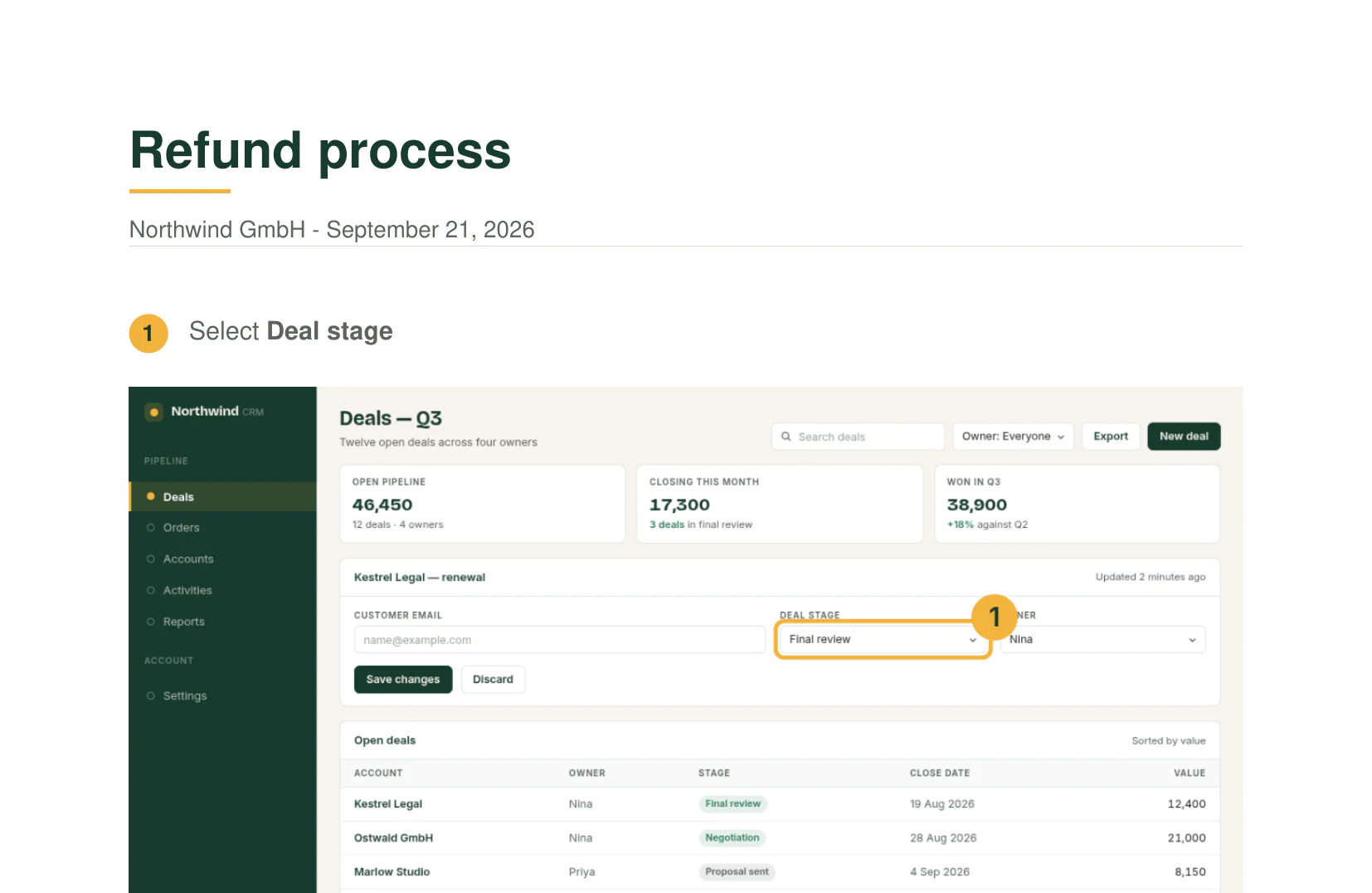
PDF
A finished document. Your name, your colour and a footer with the date, on every page.
-
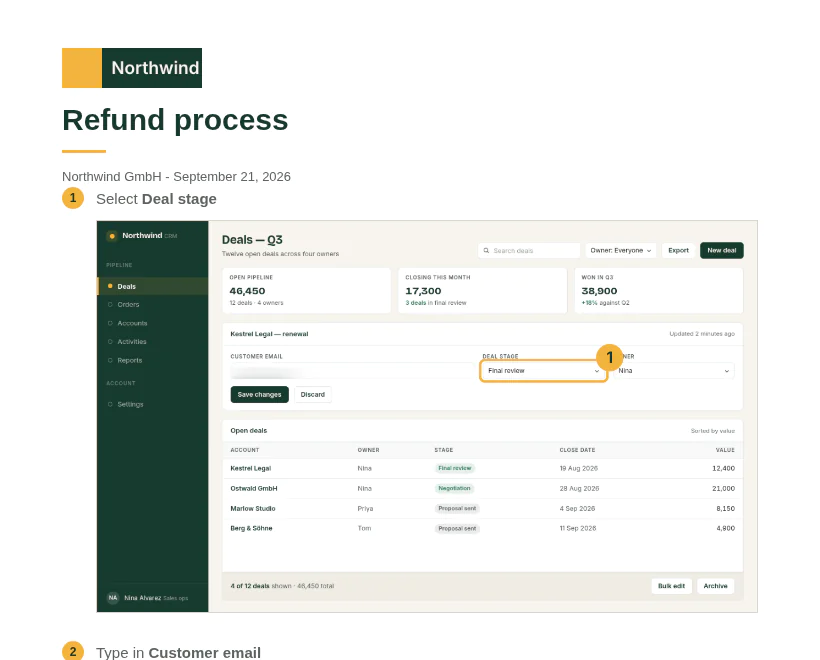
HTML
One self-contained file. The screenshots travel inside it, so it opens offline in any browser and prints to PDF from there.
-
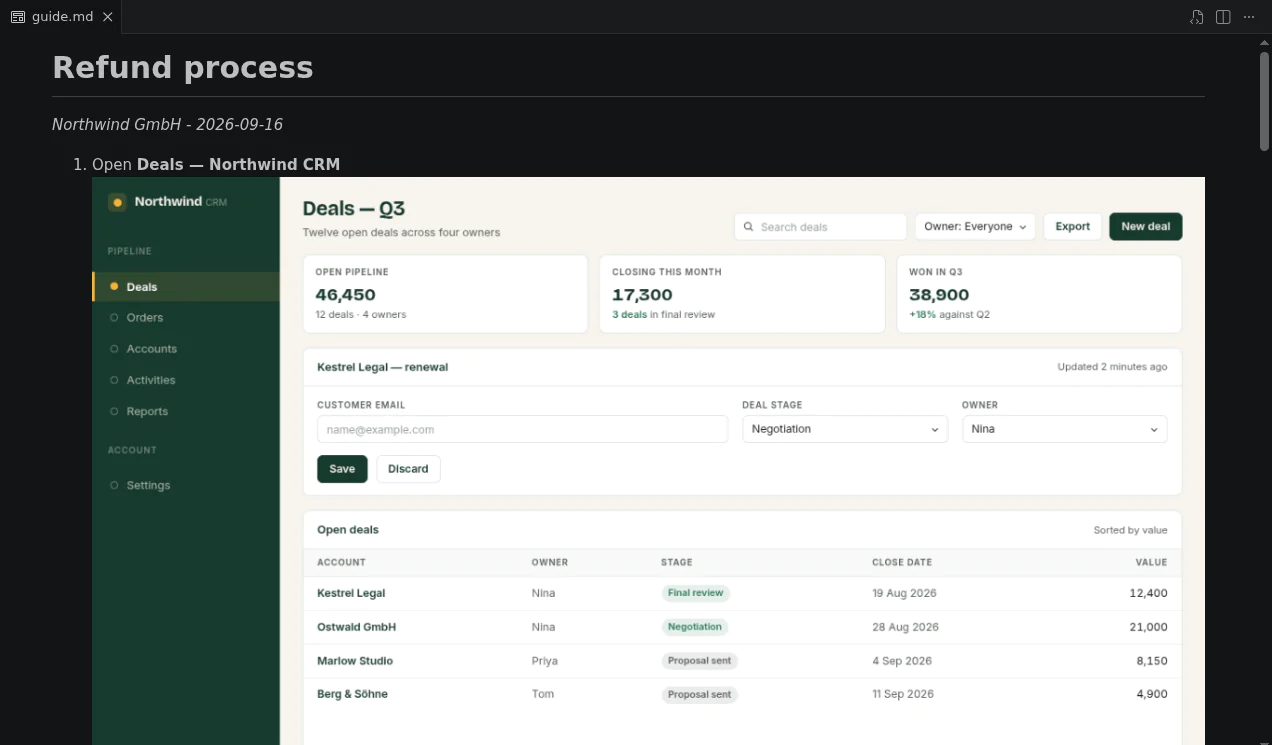
Markdown
Plain text with the screenshots in an
images/folder beside it. Any Markdown tool renders it, and it diffs like code. -
# Refund process _Northwind GmbH - September 21, 2026_ 1. Select **Deal stage**  2. Type in **Customer email** Clipboard
The same Markdown, on the clipboard in one click, for Notion, Confluence or a ticket. The image links point into the
images/folder, so export the Markdown too if you want the pictures to come with it.
The document writes itself while you work
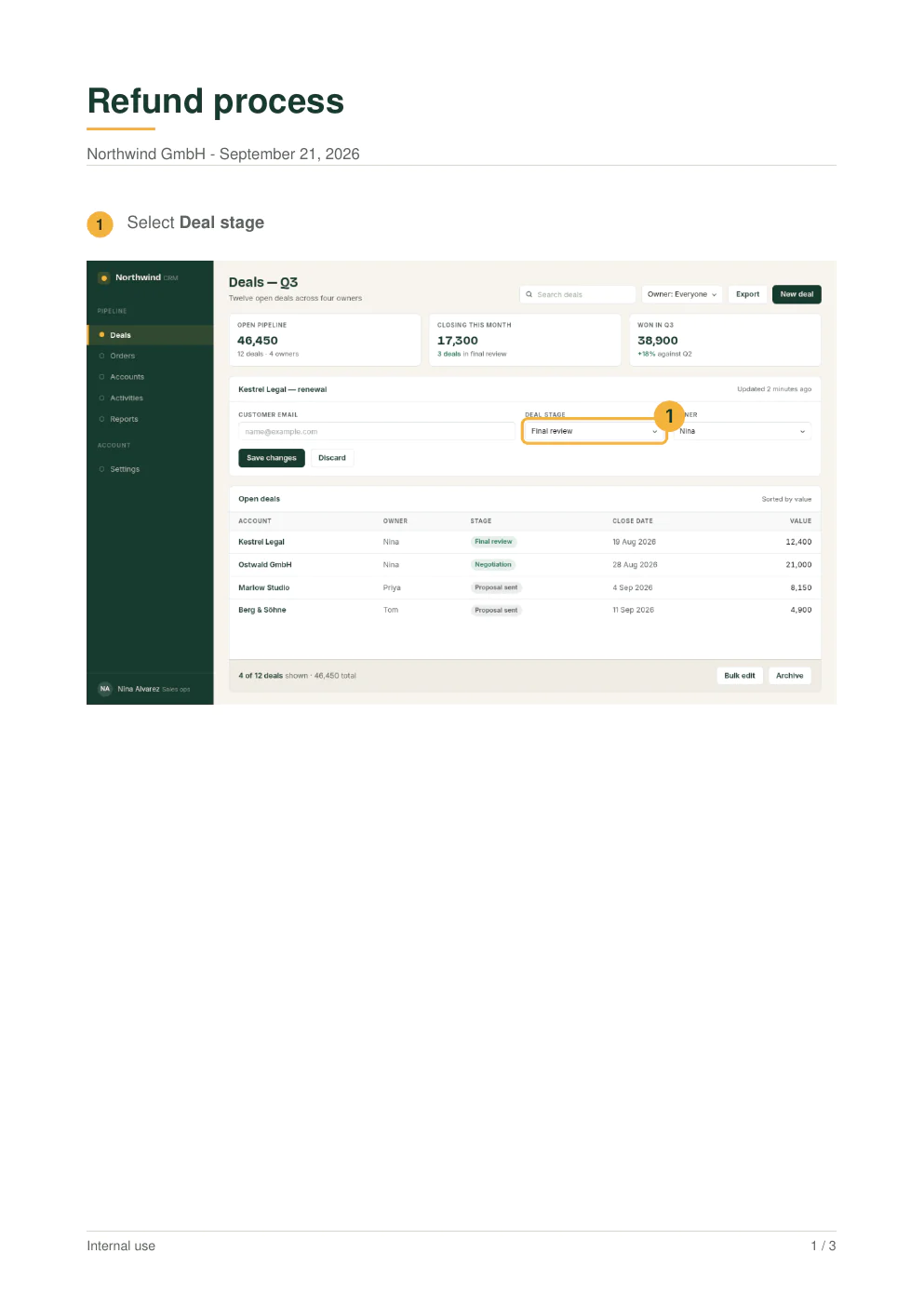
Press record, do the task the way you always do, then press stop. What comes out is a finished document: your title, your colour, and every click written down in the words the buttons already use.
-
1
Record
Nothing to set up first. You press record and work. Every click, typed field and menu choice becomes a numbered step, with the screenshot taken at that moment and the control you touched ringed on it.
-
2
Edit
The editor opens with the steps already in order. Reorder them, rewrite a sentence, merge two steps into one, add arrows and boxes where a screenshot needs pointing at.
-
3
Export
PDF, HTML, Markdown, or straight to the clipboard. The file lands in your downloads folder about a second after you ask for it.
-
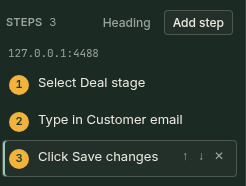 Reorder, rename, merge
-
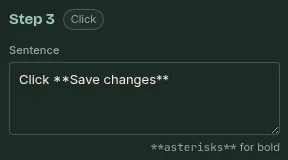 The sentence is already written
-
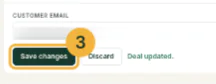 Every click, ringed and numbered
-
 Crop, blur, box, arrow, text
That is the entire product. Record one and see.
Install free Five guides at a time, free. No account.Nothing leaves your machine
Open DevTools and count the requests. There are none: not while recording, not while exporting, and not on the paid plan.
Pay once. Keep it.
Nothing here is metered. No server counts your guides, or the people using a key.
-
Free
0
To see whether the recorder fits how you work.
- 5 guides saved at a time
- PDF export
- Your name and footer line on every page
-
One payment, no renewal
Personal
59EURonceincl. VAT
For the person who writes the guides.
Everything in Free, plus:
- Unlimited guides
- No watermark
- HTML and Markdown export
- Copy straight to the clipboard
- Your logo and your colours
-
Team
149EURonceincl. VAT
For a company where more than one person writes guides.
Everything in Personal, plus:
- One key for everyone at your company
- Export your design, import it on the next desk
- Priority support
- VAT
- Included in the price.
- Updates
- All of them, free, forever.
- Refund
- 14 days, no reason needed.
Where the screenshots go
Scribe and Tango are good software and we will not pretend otherwise. The difference is one row: where your screenshots live. If that row does not matter to you, buy theirs.
| Feature | stepkeep | Scribe | Tango | Folge |
|---|---|---|---|---|
| Where your screenshots live | Your machine | Their cloud | Their cloud | Your machine |
| Price model | 59 EUR once | 25 USD a month for one person; 13 USD per seat from five seats | 15–22 USD per user, per month | 75 EUR once (89 USD) |
| Works in the browser, no installer | Yes | Yes | Yes | No, a desktop app |
| Documents desktop apps | No, browser only | Yes, on Pro | Yes, on Pro | Yes |
| Hosted share links with view analytics | No, by design | Yes | Yes | No |
| Works on a locked-down managed machine | Yes, a Chrome extension | Yes | Yes | Needs an installer |
Competitor prices and features taken from each vendor's own pages: Scribe and Tango checked 23 September 2026, Folge 16 September 2026. They change; if you find one out of date here, tell us and we will correct it. Scribe and Tango prices are billed yearly and cost more billed monthly.
Choose them instead if…
- You want a link you can send that tracks who read it. That is Scribe and Tango's job, and they do it well.
- You need to document desktop software, not browser tabs. stepkeep cannot do it at all. Folge does it for 75 EUR once, and Scribe and Tango do it on Pro.
- You need AI to rewrite your steps without you touching them.
Choose stepkeep if…
- Your data protection officer, client contract or works council has already said no to cloud screenshots.
- You write a handful of guides a month and a monthly bill makes no sense.
- Your IT department controls what gets installed, and a browser extension is the only door open.
Asked before buying
How long does a twenty-step guide actually take?
About as long as doing the task once, plus the few minutes you spend tidying afterwards. There is no writing stage: the sentences are already there, taken from the labels on the buttons you pressed. What is left is reordering a step or two, renaming one the page gave a poor label, and dragging a blur over anything that should not leave the building.
How is paying once sustainable?
There is no server, so a customer costs us nothing after purchase. That is the entire trick. Every update is free, forever. There is no version 2 waiting to be sold to you, and no renewal. It keeps working, offline, for as long as Chrome runs extensions.
You sell a company-wide licence but nothing checks. Why?
Because nothing can. The key is verified on your machine and never phones home, which is the same architecture that keeps your screenshots off our servers. We could only enforce a head count by building the thing we promised not to build. So we ask instead: one person buys Personal, a company buys Team.
How do I share a guide with a colleague?
Export it and send it the way you send any file: attach the PDF, drop the single HTML file in the shared drive, paste the steps into Confluence. If you need hosted links with view analytics, Scribe is the right tool and we say so on the comparison above.
Is it really local? Prove it.
Open DevTools on the Network tab and use stepkeep for a week. Count the requests. There are none, on either plan. Your licence key is a signed message this extension verifies against a key built into it, so there is nothing to phone home to. Turn off the wifi and everything still works, including the paid features.
What about AI rewriting?
Not in v1. An AI that rewrites your steps needs either a server, which breaks the whole promise, or your own API key. If it arrives, it will use your key and be off by default.
Why not just use Folge?
Folge is good, and it made the same bet we did: that people will pay once to keep their own screenshots. Choose it if you need to document desktop apps. Choose stepkeep if you document browser tasks, cannot install software, or want to roll it out to a team through Chrome policy.
Will my IT department allow it?
Five permissions, no host access until you press record, no remote code, single purpose.
Send them the permissions list above. If they want a policy, it installs through
ExtensionInstallForcelist like any other extension.
What if a page blocks screenshots?
Some pages, and some canvas apps and iframes, refuse to be captured. You are never stuck: add the step manually, paste your own image, or recapture that one step later.
Record one task today. Keep the guide forever.
Free keeps five guides at a time, which is enough to know. 59 EUR once removes the
limit and the watermark.
14 days to change your mind, no reason needed.