Free work instruction template (Word, PDF) with room for numbered screenshots
Most work instruction templates are an empty table: title, scope, responsible, steps. The header takes five minutes. The steps take the afternoon, because every one needs a sentence and a screenshot you capture, paste and crop by hand. Below are the fields to copy, and a filled-in example where stepkeep wrote each step from a click.
Download the blank template, free and with no email:
Word · OpenDocument · PDF · Markdown
It is a Chrome extension: nothing is uploaded, no account, $59 once.
- On your machine
- $59 once
- PDF, HTML, Markdown
Download the work instruction template
The template holds a header block (document ID, version, area, owner, parent SOP), purpose and scope, safety and data protection notes, prerequisites, a numbered step table with a screenshot column and a result check, problems and deviations, a revision history and an approval block to sign. Replace every text in [brackets].
| Format | Blank template | Filled-in example |
|---|---|---|
| Word, .docx: Word, Google Docs, Pages | Template, .docx (9 KB) | Example, .docx (206 KB) |
| OpenDocument, .odt: LibreOffice, Google Docs | Template, .odt (33 KB) | Example, .odt (229 KB) |
| PDF: to print and fill in by hand | Template, PDF (45 KB, 2 pages) | Example, PDF (108 KB, 2 pages) |
| Markdown, .md: wikis, Git, Notion | Template, .md (2 KB) | Example, .md (1 KB) |
Work instruction example
The example is the same template filled in for one real task: voiding an unpaid invoice in a web app, five steps, each with the screenshot of what to click and the check that it worked, plus what to do when the invoice turns out to be paid.
What a Word or Excel template does better
The free templates from quality management sites are the right start for many work instructions. Here is where they beat a recorder.
- Any process, not only the browser. A template works for the machine on the shop floor, the lab bench and the warehouse. stepkeep records Chrome tabs and nothing else.
- Approval fields built in. QM templates carry document number, version and the created, checked and approved lines. A stepkeep export carries a title, a company name and a date; the rest you add in your document system.
- Your document system already knows it. A .docx drops into the numbering, layout and archive your QM handbook already uses, without anyone installing anything.
- It costs nothing. The templates are free downloads. stepkeep is free for five guides, then $59 once.
How to create a work instruction: three ways to fill in the steps
| Feature | stepkeep | Word or Excel template | Scribe |
|---|---|---|---|
| What you start with | A recording. Each click in a browser task becomes a numbered step with a sentence | Blank fields and a step table, as Word or Excel files12 | A recording of a web app, turned into steps3 |
| Screenshots | One per step, with a numbered ring on what was clicked. Blur and crop in the editor | You capture and paste each one. The visual template leaves room for images1 | One per step, taken during the recording3 |
| Price | Five guides free. $59 once; Team $149 once for a whole company | Free download2 | Basic free. Pro Personal 25 USD a month, Pro Team 13 USD a seat a month from five seats, both billed annually4 |
| Account | None | None for the download2 | Required5 |
| Files you can hand over | PDF, single-file HTML, Markdown with an images folder, Markdown to the clipboard | The .docx or .xlsx you filled in1 | PDF, HTML and Markdown on Pro; not on Basic4 |
| Where it works | Chrome tabs only | Any process you can describe and photograph | Web apps; desktop capture on Pro4 |
Templates and prices checked on on each provider's own pages. They change; if one is out of date, tell us and we will correct it.
- Smartsheet work instruction templates: ten templates as Excel and Word files.
- qualitaetsmanagement.me sample work instruction: a free sample, no sign-up.
- Scribe annotation tools page: each click, entry or page change is described and captured as an annotated screenshot.
- Scribe pricing page: plans, prices, exports and desktop capture.
- Packted, Scribe onboarding teardown: sign-up asks for a work email, name and password.
The template: what goes into a work instruction
Copy the fields below into your own document. The middle part is filled in from the example, so you can see how specific a step has to be.
- With stepkeep
- You write the header. The steps and their screenshots come from one run through the task.
- With a blank template
- You write the header, then every step and every screenshot by hand.
Header
- Title: verb and object, for example Refund an order.
- Document number, version and valid from.
- Purpose: what the task achieves, in one sentence.
- Scope: which team, which system, which cases.
- Responsible: who does the task, who owns the document.
- Prerequisites: access rights, logins, what must be open.
Steps, filled in
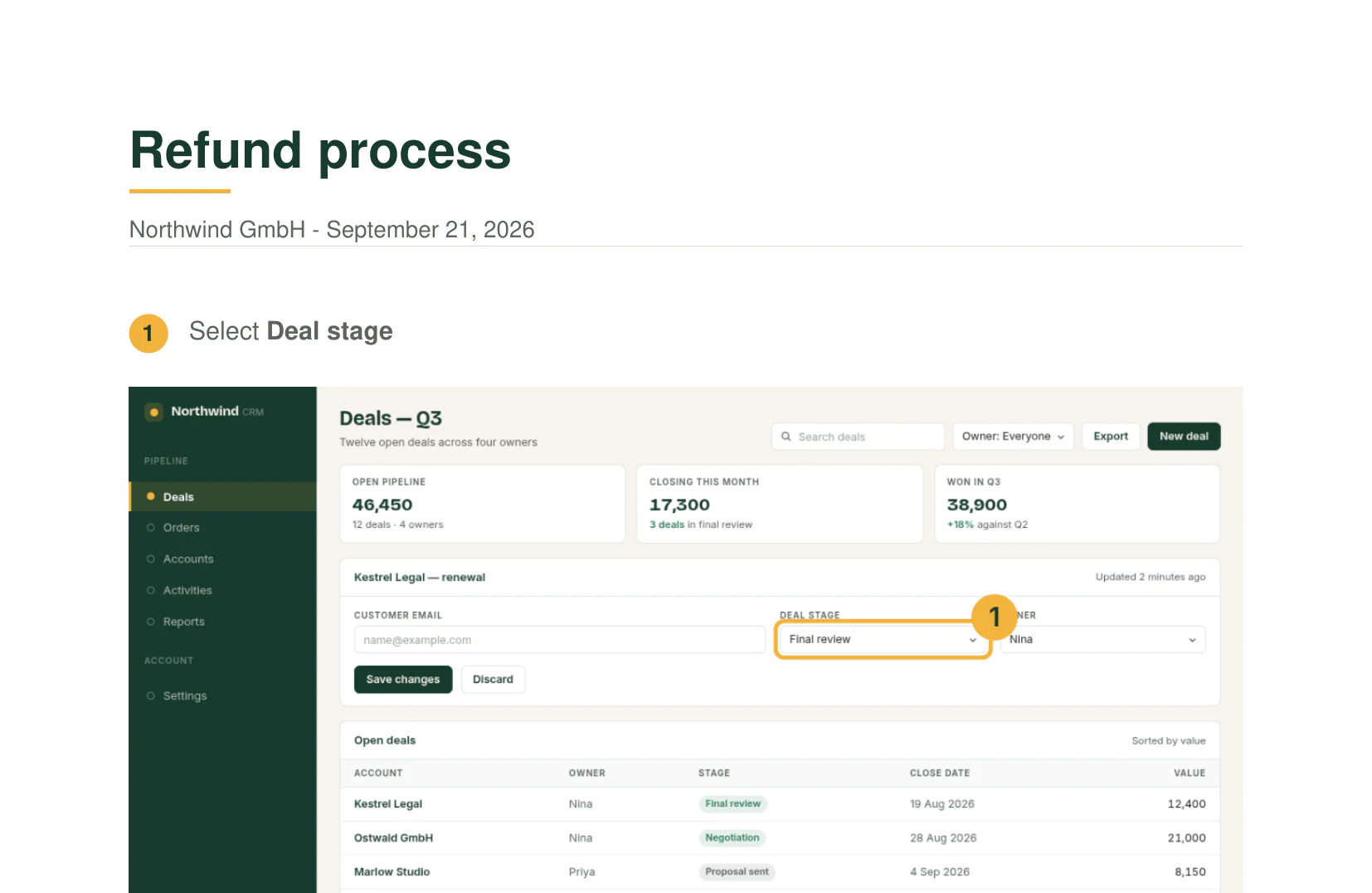
One action per step, the verb first, a screenshot with the click marked. From the example, a refund in a small CRM:
- Open Deals in Northwind CRM.
- Select the deal stage.
- Type in the customer email (blurred in the screenshot).
- Open Orders in Northwind Billing.
- Type in the order search.
- Click Export CSV.
Open it as a PDF or a single HTML file.
Close
- Result: how you know the task is done.
- Warnings and exceptions: what not to click, who to ask.
- Related documents: the procedure this instruction belongs to.
- Created, checked, approved: name and date for each.
- Change history: version, date, what changed.
Fill in the steps with stepkeep
Pick a task that happens in the browser: an ERP, a CRM, a helpdesk or an admin panel. The first five guides are free.
-
Add the extension to Chrome
From the Chrome Web Store. No account and no card.
-
Do the task once with recording on
Each click becomes a numbered step with a screenshot and a sentence. Rewrite a step, blur a customer's name, crop what nobody needs to see.
-
Export into your template
Export PDF or HTML, or take the Markdown and its images folder into your Word template under the header fields.
Blank template or recorded steps
Use a blank template if…
- The work happens away from a screen: at a machine, in the lab, in the warehouse.
- The instruction has three steps and changes once a year.
- Your QM system prescribes one fixed document layout and nothing else.
Use stepkeep if…
- The work happens in the browser: ERP, CRM, helpdesk, admin panels.
- The screenshots show customer or staff data that must not go to a third-party cloud.
- You write many instructions, and the software changes often enough that you redo them.
Work instruction questions
What is a work instruction?
A document that tells one person how to do one task, step by step, at one workplace or in one system. It sits below a procedure, which describes who does what across a whole process. A work instruction is specific enough that someone new can follow it without asking.
What belongs in a work instruction?
A header with title, number, version, purpose, scope, responsible and prerequisites; the numbered steps, one action each, with a picture where a screen or part is involved; and a close with the result, warnings, related documents and the approval lines. The template section above lists every field.
How detailed should each step be?
One action per step, the verb first: open, select, type, click. Name the button or field exactly as it is labelled on screen. A screenshot with the clicked element marked answers most follow-up questions before they are asked.
Can I put the screenshots into my own Word template?
Yes. The Markdown export saves every screenshot as an image file in an images folder, which you insert into your document. Or attach the PDF or the single HTML file as it is; both carry the screenshots inside.
Are the screenshots uploaded anywhere?
No. Recording, editing, blurring and export run in your browser, and stepkeep has no server to upload to. The page on stepkeep as an offline SOP tool shows how to check that yourself.
Is it free?
The free plan keeps five guides and exports a PDF with a small watermark. Personal is $59 once, Team $149 once for a whole company. There is no subscription.
Record your next work instruction instead of typing it
The free plan keeps five guides. $59 once removes the limit and the watermark; $149 once covers the team.
14 days to change your mind, no reason needed.